


By Louis Balla, Chief Revenue Officer, Nuage. Updated October 2026.
NetSuite project management is the set of project features inside NetSuite ERP. Basic Projects tracks projects as part of a customer record. Project Management adds project records separate from customers, with tasks and resource assignments. Project transactions, and with Job Costing the labor cost of time, post to the same general ledger as the rest of the business.
For larger services organizations, Oracle also offers NetSuite SuiteProjects Pro, formerly NetSuite OpenAir. It is a separate professional services automation (PSA) application that connects to NetSuite through an integration. Which of these your account includes depends on your subscription, so confirm the details with your NetSuite account team before you plan around a feature.
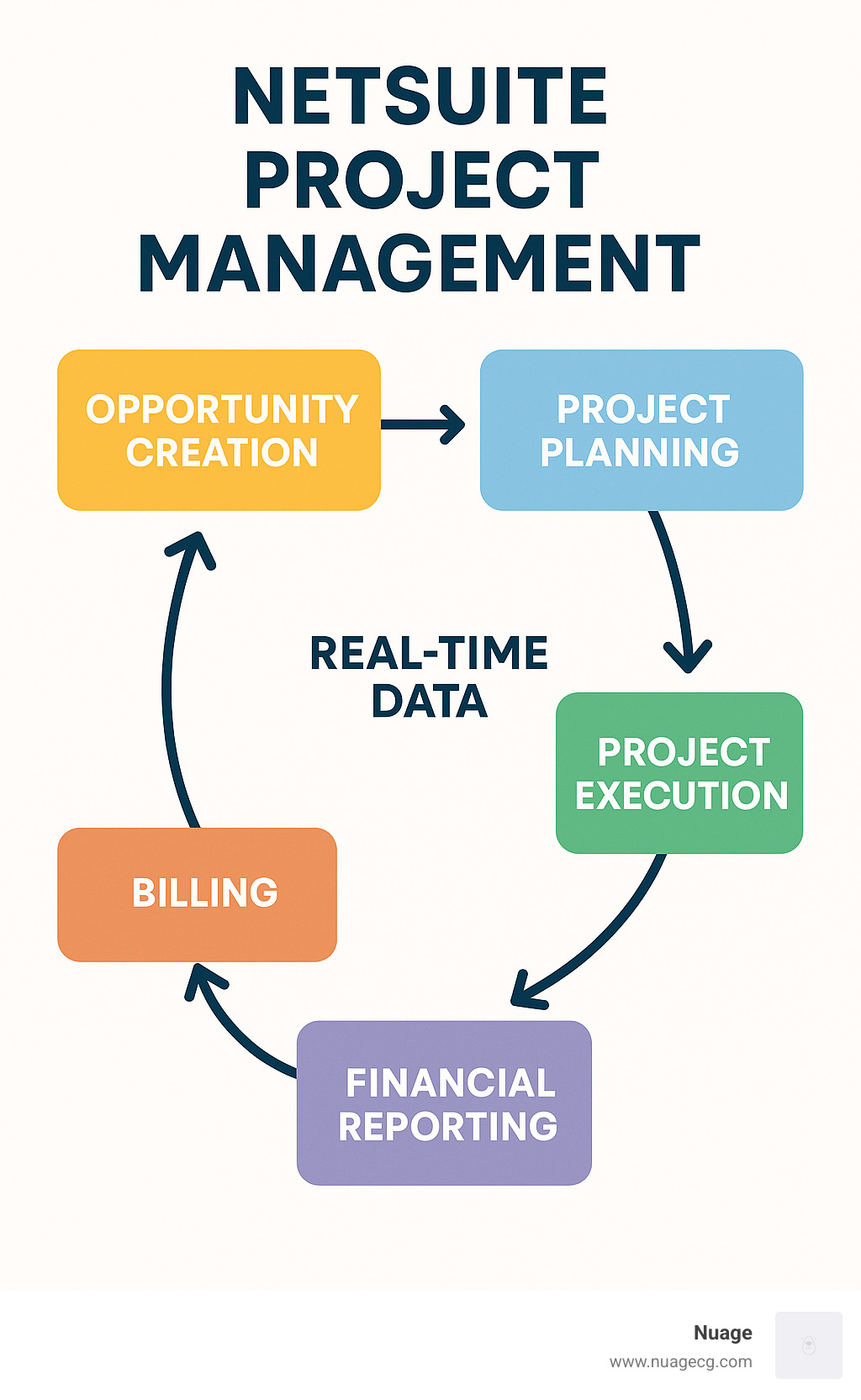
What is NetSuite project management?
NetSuite project management covers a project from the sale to the final invoice. A project can be set up by hand, or a sales order for a service item can create one from a project template. The project manager builds the task plan and assigns people to it, then sets the budget and billing terms. As work goes on, people log time and expenses against their tasks, and finance bills the customer and recognizes revenue under the rules set on the project.
NetSuite project management terms
- Project: the record that holds an engagement’s tasks, assigned resources, budget and billing setup.
- Customer: the client the project is for. Every project rolls up to a customer, so you can see all work done for one client.
- Service item: a service you sell. It can be set up so that selling it creates a project.
- Project task: a unit of work on the project plan. Tasks can sit under parent tasks for larger work breakdowns.
- Resource: a person assigned to the project, with a cost rate and a billing rate.
- Milestone: a checkpoint in the plan. On fixed-fee work it often decides when the customer is billed.
- Charge: a billable amount NetSuite creates from project activity when a project uses charge-based billing.
- Project template: a saved project structure with the standard tasks and roles for one type of engagement, used to start each new project of that type.
Templates are most useful for engagements you sell repeatedly, such as a standard implementation or a recurring service. The next sections cover how to follow a project once it is running.
NetSuite project management modules: Basic Projects, Project Management and SuiteProjects Pro
Oracle’s documentation on enabling project features describes the two options inside NetSuite. Basic Projects uses the Projects feature. Project Management needs both the Projects feature and the Project Management feature. Further capabilities are separate features on top of Project Management:
- Milestone billing needs Advanced Billing.
- Resource allocations need the Resource Allocations feature.
- Job costing and project budgeting need the Job Costing and Project Budgeting feature plus Time Tracking.
| Basic Projects | Project Management | SuiteProjects Pro | |
|---|---|---|---|
| Where it runs | Inside NetSuite | Inside NetSuite | A separate PSA application connected to NetSuite |
| How projects are recorded | Created from the customer record, with the project’s time, contacts and transactions | As project records kept separate from customers, with more project detail | In SuiteProjects Pro, with project financial data passed to NetSuite through the integration |
| What to confirm with your account team | Whether the Projects feature is in your subscription | Which add-on features you need, such as Advanced Billing or Resource Allocations | How the integration is set up and which records sync |
The first questions in an evaluation are which project features your account already has and whether your contracts and reporting need the features that sit on top of Project Management. A services organization that runs most of its business through project delivery may also evaluate SuiteProjects Pro. Bring both questions to your account team, since availability depends on your subscription.
How NetSuite project accounting works
Project accounting in NetSuite is the financial side of the project record. Because project transactions post to the general ledger, finance can report project margin without reconciling a separate project tool against the books.
Job costing and project budgets
With Job Costing and Project Budgeting turned on, you can set cost and billing budgets for a project and compare them with actual results. Labor cost comes from the cost rates of the people logging time, and expenses and purchases charged to the project add to its cost.
What counts as labor cost is a setup decision, and it changes the margin your project managers see. A construction company’s job profitability reports left out labor burden, such as workers’ compensation, payroll taxes and vacation pay. To see true job margin, project managers exported to Excel and ran three extra steps. Our team built a script that updates each project’s labor cost when it is missing or changes. We tested it in sandbox and deployed it to production 35 days after the request. The client’s reply to the approach was “That works for us; thanks.”
Revenue recognition for projects
Oracle’s Project Revenue Recognition feature lets you defer revenue on charge-based projects and recognize it independently from customer billing, so the invoice schedule and the revenue schedule can differ. You create project revenue rules (as charged, percent complete or fixed amount) from the project’s charge rules. The feature needs Project Management, Charge-Based Billing and Advanced Revenue Management (Essentials). Agree the rules with your controller and auditors before go-live, because they decide when project revenue reaches the income statement.
How do you track a project in NetSuite?
NetSuite project tracking is part of the Project Management feature, and Oracle’s chapter on using project management covers the pieces:
- Project record as a workspace: the Schedule subtab holds a Gantt chart that compares actual progress with the original baseline and shows the project’s critical path.
- Project Center and Project Dashboard: the Project Center is a workspace with tabs for projects, time and expenses, and reports. Each project also has its own dashboard with portlets, quick links and a percent-complete meter.
- Project indicators: a portlet on the project dashboard with three color-coded signals. Expense To Approve counts unapproved expense lines, Time Not Tracked shows how much planned time has been matched by actual hours, and Time To Approve counts unapproved time entries. The portlet reads last week’s data, so entries submitted this week appear next week.
- Plan recalculation: NetSuite recalculates the project plan when tasks, the project, timesheets or resource allocations change, and an asynchronous option runs the recalculation in the background.
On a construction job, the project dashboard is where a project manager follows one job, and a dashboard can be published to the project manager role. Oracle notes that a Key Performance Indicators portlet for a complex financial report, such as an income statement, might show data from all projects, so for one project you create a custom report with project filters.
NetSuite project management by role
Project managers need their own projects, open tasks and budget position on one page. A dashboard published to the project manager role can put these together. Our guide to NetSuite dashboards shows how to build and publish role dashboards.
Controllers and finance teams need to know what is ready to bill and whether project margin includes all of the cost. The billing and job costing sections of this article cover the setup decisions behind those answers.
Resource and operations managers need to see who is assigned where. With the Resource Allocations feature, managers can plan people’s time on projects and report utilization from worked, allocated or assigned hours.
Consultants and field staff enter time and expenses against their tasks and see their assignments. Oracle’s page on approving time and expenses for projects notes that billable project time must be approved before the customer can be billed. A project manager or time approver approves time, and the employee’s supervisor or expense approver approves expenses.
Project billing in NetSuite: fixed fee, milestone and time and materials
Oracle’s project billing documentation lists four billing approaches. You choose the billing type and schedule on the Financial subtab of the project record.
- Time and materials: bill the customer for resource time and project expenses as they are incurred.
- Fixed bid, interval: bill a fixed fee in installments at set intervals.
- Fixed bid, milestone: bill a fixed fee by percent complete or at preset milestones.
- Charge-based: set up charge rules that create billable charges from project activity, for more flexible billing.
Many services contracts mix these, for example a fixed fee for the initial build and time and materials for later change requests. Map each contract type to a billing type before you build templates, so every new project starts with the right setup.
Milestone billing also needs a report that shows what is ready to bill. An engineering services firm bills fixed-fee projects by milestone. Its billing report was built on charge records, which are created when a milestone starts and become billable only when the task completes. Managers could not tell from the report which milestones were ready to bill. We changed the report to show the milestone task. Separately, we mocked up in sandbox how sub-tasks roll into one milestone line on the customer invoice. Our NetSuite reporting solutions guide covers the saved searches and reports that sit behind views like this one.
NetSuite project estimating and billing forecasts
Oracle’s page on generating an estimate from a project says the project must be finalized first. The estimate picks up the service items and billing information from the project record, and you can update the project and generate more estimates if the scope changes. An approved estimate can be converted to a sales order. Oracle’s page on forecasting project billings describes billing forecasts that are based on planned effort across billing intervals and adjust as actual work is recorded.
Project governance in NetSuite
Project governance in NetSuite means building approvals and review points into the system so every project follows them. A practical setup order:
- Build a project template for each type of engagement, with standard phases, tasks, roles and default billing terms.
- Set up time and expense approvals, so billable time is approved before it is billed.
- Save a baseline when the project plan is approved, then compare the current plan against it when dates move.
- Publish a dashboard to each role that shows that role’s projects, tasks and budget position.
- Review budget against actuals on a fixed schedule, such as monthly with finance, and record what changed.
If you are setting up projects as part of a wider rollout, our guide to NetSuite implementation best practices covers planning and phasing.
NetSuite project management review: what to check before you commit
NetSuite’s main strength for project work is that project records sit in the same system as customers, time, expenses, billing and revenue. A closed opportunity can lead straight to a project, and project margin can be reported from the same books the auditors see.
When you evaluate it for your own business, check these points against your contracts and reports:
- Feature coverage: which project features your subscription includes, and which add-on features your billing and costing need.
- Billing fit: whether each of your contract types maps to time and materials, fixed bid interval, fixed bid milestone or charge-based billing.
- Cost completeness: whether labor cost on projects should include burden, and how it will be loaded.
- Report readiness: whether project managers and finance can see what is ready to bill and how each project’s margin is tracking without exporting to a spreadsheet.
- Scale of resource planning: whether your resource planning needs fit inside NetSuite or call for a dedicated PSA application such as SuiteProjects Pro.
How Nuage approaches NetSuite project management
In the two projects described above, our team followed these steps:
- Start from the report the team could not rely on. At the construction company it was job profitability, and at the engineering services firm it was the milestone billing report.
- Trace the report to the records behind it. The margin left out labor burden. The billing report was built on charge records that become billable only when the task completes.
- Make the change, using sandbox first. That meant a script for labor cost, tested in sandbox before production, in one case, and a report change plus a sandbox mock-up of the invoice in the other.
Read more about Nuage’s NetSuite optimization and managed services.
NetSuite project management FAQ
What does the NetSuite project management module include?
The Project Management feature adds project records kept separate from customers, project tasks with dependencies, resource assignments and the link from sales orders to projects. Capabilities such as milestone billing and resource allocations are separate features that work with it, and job costing with project budgets also needs Time Tracking. Which of them your account has depends on your subscription, so confirm the list with your NetSuite account team.
What is the difference between NetSuite project management and project accounting?
Project management is the delivery side: the plan, the tasks, the people assigned and the time they log. Project accounting is the financial side of the same record: budgets, job costing, billing and revenue recognition. In NetSuite both work from one project record, so the hours a consultant logs become project cost and, on time and materials work, billable time.
Can NetSuite project management work for oil and gas companies?
Oil and gas service companies that work job by job can track each job as a project with its own budget and billing terms. The points to test in an evaluation are how field crews enter hours along with mileage and equipment use, and whether job cost includes labor burden. The construction example above shows how our team loaded labor burden into project labor cost.
Is SuiteProjects Pro the same as NetSuite project management?
No. NetSuite project management runs inside NetSuite ERP through the Projects and Project Management features. SuiteProjects Pro, formerly NetSuite OpenAir, is a separate professional services automation application that connects to NetSuite through an integration. Organizations that run most of their business through project delivery sometimes evaluate it. Ask your NetSuite account team which option fits your subscription and your resource planning needs.
How do you track labor and material costs against a project in NetSuite?
With Job Costing turned on, time entered against project tasks becomes labor cost at each person’s cost rate, and expenses and purchases charged to the project add to its cost. Project transactions post to the same general ledger as your financials. If a separate scheduling platform records the hours, the cost reaches NetSuite only through an integration, so ask which records sync and how often before you plan around real-time cost.
About the author
Louis Balla is Chief Revenue Officer at Nuage, a NetSuite optimization partner that has served 250+ clients since 2011 and holds a 4.9 out of 5 rating on Clutch. The client project work in this article was done by Nuage’s NetSuite experts.


