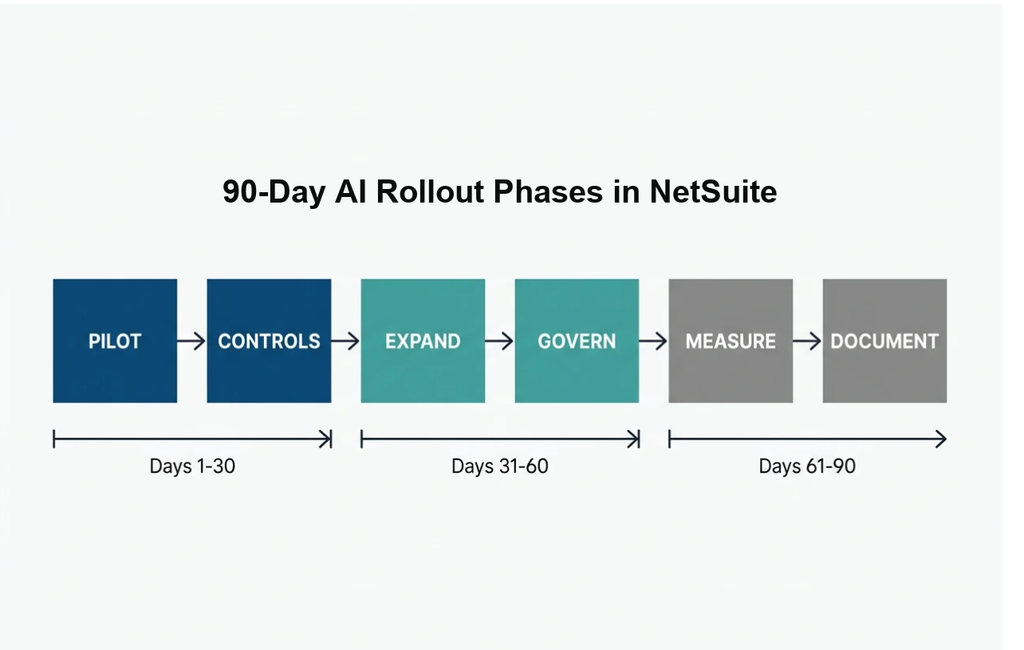
A NetSuite AI agent rollout that actually sticks follows three 30-day phases: automate one painful workflow while building approval controls and an audit trail first, expand to a second process with clear sign-off rules in month two, then measure results and document everything so it survives both an audit and a staffing change by day 90.
Across roughly 139 recorded conversations with finance and operations teams at manufacturers and distributors, one pattern shows up constantly. Teams ask about adding automation. They almost never ask how to stay in control of it. And the pain from that gap is already real. Different departments build automations that overlap and conflict. People lose visibility into work they used to own. Eventually nobody can answer “who changed this and when.” That gap between wanting AI and governing AI is exactly what a phased rollout plan closes.
The industry numbers back this up. Most companies still run manual processes for work that could be automated, and outdated or manual processes cost companies significant sums each year. Meanwhile, companies typically use only a small portion of their ERP capabilities. The waste is in the approach. Below is the phase-by-phase plan to put AI to work inside NetSuite without losing control of your numbers, your audit trail, or your team’s trust.
Key Points
- A NetSuite AI agent rollout that sticks follows three 30-day phases: automate one painful workflow while building approval controls and an audit trail first, expand to a second process with clear sign-off rules in month two, then measure results and document everything so it survives both an audit and a staffing change by day 90.
- Most companies still run manual processes for work that could be automated, and outdated or manual processes cost companies significant sums each year, while companies typically use only a small portion of their ERP capabilities.
- Before a single automation runs in production, define who can change the automation’s configuration, which transactions still route to a human sign-off before posting, and what gets logged so anyone can answer “who changed this and when.”
- For the full first 30 days, run the automation alongside the existing manual process so your team keeps doing what they’ve always done while the automation runs in parallel, then compare the outputs to surface exceptions and edge cases where the automation’s logic doesn’t match reality.
- Month two requires a central register of every automation running in your environment because different teams build automations that touch the same records, and neither team tells the other, resulting in data that doesn’t reconcile and nobody knows why because both automations “worked correctly” in isolation.
- NextFoods went from manual chaos to automated excellence within 90 days, eliminating 15 manual workflows and reducing their financial close from 4-6 weeks to under 2 weeks while freeing up 20+ hours per week for strategic work.
What Is a NetSuite AI Agent?
A NetSuite AI agent is software that performs tasks inside your ERP autonomously, making decisions and taking actions based on rules you define and data it observes.
Unlike traditional automation that follows rigid if-then scripts, AI agents adapt to context. They can match invoices to purchase orders even when line items appear in different sequences, flag exceptions that fall outside normal patterns, and route approvals to the right person based on transaction attributes.
The practical difference shows up in how much manual intervention you need. A workflow automation might stop when it encounters a vendor name spelled two different ways. An AI agent recognizes the match and keeps going.
That adaptability is what makes AI agents valuable for finance and operations work. They handle the repetitive decisions that consume hours each week while still escalating the exceptions that need human judgment.
Understanding Agentic AI in Enterprise Systems
Agentic AI refers to systems that act with a degree of autonomy, pursuing goals you set without requiring step-by-step instructions for every scenario.
In an ERP context, agentic AI means the system can decide which journal entries to post automatically, which to flag for review, and which to escalate based on risk thresholds you configure. It observes patterns in your data, learns what normal looks like, and surfaces deviations.
The key distinction is agency. Traditional automation executes the exact sequence you programmed. Agentic AI evaluates the situation and chooses the appropriate action from a set of options you approved in advance.
This matters because your business processes contain more exceptions than you can script. An agent that can handle routine variance without human input frees your team to focus on the cases that actually require expertise.
The risk is also higher. An agent making decisions on your behalf needs guardrails, approval thresholds, and an audit trail that captures what it did and why. That’s why governance comes first in every phase of this rollout plan.
NetSuite AI Overview: How AI Transforms Your ERP
NetSuite AI brings machine learning and intelligent automation directly into your ERP, transforming how you handle financial operations, supply chain decisions, and customer interactions.
At its core, NetSuite AI analyzes the transaction patterns, master data, and process flows already in your system. It learns what normal looks like for your business, then uses that baseline to surface anomalies, automate routine decisions, and route exceptions to the people who need to see them.
The practical impact shows up in three areas. First, you reduce the manual work that consumes hours each week. Second, you catch errors and exceptions earlier, before they cascade into bigger problems. Third, you free your team to focus on judgment calls and strategic work rather than data entry and reconciliation.
NetSuite AI includes capabilities like intelligent document processing that extracts data from invoices and receipts, predictive analytics that forecast demand and cash flow, and conversational interfaces that let you query your data in plain language.
The difference between NetSuite AI and standalone AI tools is integration. The AI operates on live data inside your ERP, so it sees the full context of every transaction. It knows your chart of accounts, your approval hierarchies, your vendor terms, and your customer history. That context is what makes the automation accurate enough to trust.
For finance teams, this means journal entries that prepare themselves, reconciliations that flag discrepancies automatically, and close processes that compress from weeks to days. For operations teams, it means inventory counts that stay accurate, replenishment orders that trigger at the right time, and cycle count schedules that prioritize high-risk items.
The challenge is governance. AI that touches your financial records needs the same controls you apply to human users. You need to know what it changed, why it made that decision, and who reviewed it if approval was required. That’s why every phase of this rollout plan builds controls and audit trails alongside the automation itself.
NetSuite AI Capabilities Across Business Functions
NetSuite’s AI capabilities span financial management, supply chain operations, and customer relationship workflows. Each function benefits from automation that reduces manual data entry and surfaces insights buried in transaction volume.
Financial Management
AI agents in NetSuite can automate journal entry preparation, match bank transactions to open items, and flag reconciliation discrepancies before they reach your controller.
Month-end close workflows compress when the system handles routine accruals, prepares standard adjustments, and routes exceptions to the right approver based on account and amount. Finance teams reclaim hours previously spent on data gathering and can redirect that capacity toward analysis and planning.
Audit trail requirements remain the same. Every automated posting needs a clear record of what triggered it, which rules applied, and who reviewed it if human approval was required.
Inventory and Supply Chain
Operations teams use AI agents to improve inventory accuracy, automate cycle count scheduling, and predict stockouts before they disrupt production.
An AI agent monitoring on-hand quantities can trigger replenishment orders when stock falls below dynamic thresholds that adjust for seasonality and lead time variance. It can flag discrepancies between physical counts and system records, prioritize high-value or fast-moving items for more frequent counts, and surface patterns that indicate process issues upstream.
The result is fewer emergency orders, less safety stock, and better visibility into what’s actually available to promise customers.
Order Management and Customer Service
AI agents streamline order processing by validating customer data, checking credit limits, and routing orders that fall outside normal parameters for manual review.
When an order arrives with a shipping address that doesn’t match the billing address on file, or a quantity that exceeds the customer’s typical purchase pattern, the agent can flag it for verification rather than letting it process automatically. This reduces errors, chargebacks, and the cost of correcting mistakes after fulfillment.
Customer service teams benefit from agents that surface order history, payment status, and open issues in a single view, reducing the time spent toggling between screens and improving first-contact resolution rates.
Before You Start: NetSuite AI Readiness Is the Prerequisite
This rollout plan assumes your data is clean and your foundation is set. If you haven’t done that work yet, start with the NetSuite AI readiness framework that prepares your ERP for what comes next. That piece covers chart of accounts hygiene, item and master data quality, role permissions, and sandbox testing.
Think of the relationship between the two pieces this way.
The readiness framework is the inspection before you start building. This article is the construction schedule. Skipping the inspection means every phase below carries risk you didn’t need to take.
Your NetSuite AI roadmap starts with readiness and moves into execution. Once your data is trustworthy and your permissions are mapped, the 90-day clock begins.
Days 1–30: Your First NetSuite AI Agent Workflow, Controls First
Pick One Painful, Contained Process
You’re automating one workflow in month one.
Pick something that hurts enough to justify the effort and is contained enough to limit the blast radius if something goes wrong.
Louis Balla, Nuage’s CRO, recommends starting with either inventory accuracy or month-end close prep. Why those two? Because the pain is visible, the manual cost is measurable, and the data involved is already inside NetSuite.
If your ops team does a monthly physical count because they can’t trust the on-hand numbers, that’s your signal.
AI for inventory accuracy means you automate cycle count scheduling, flag variance exceptions, and surface discrepancies before they compound.
If your controller’s team rebuilt half the close process in Excel because the platform doesn’t meet their needs, AI for the close means you automate journal entry prep, reconciliation matching, and exception routing. Controllers who invested in NetSuite and feel they’re barely using it tend to see results here fast.
Build Approvals and Audit Trail Before Turning Anything On
This is where most teams skip ahead and regret it.
Before a single automation runs in production, define three things.
- Who can change the automation’s configuration, and who can only view it
- Which transactions still route to a human sign-off before posting
- What gets logged so anyone can answer “who changed this and when”
These are the internal controls your auditors will ask about.
IDC research found that 60% of security leaders lack basic agent containment controls, and 35% cannot shut down a rogue agent once deployed. You don’t want to be in that group when your external auditor asks how you approve automated journal entries.
An audit trail is the foundation that makes automation trustworthy. For a deeper look at what that logging should capture, see how to keep an audit trail when AI is doing the work in NetSuite.
Run Parallel and Let the Team Double-Check
For the full first 30 days, run the automation alongside the existing manual process.
Your team keeps doing what they’ve always done. The automation runs in parallel. At the end of each cycle, compare the outputs.
This parallel period does two things. It builds confidence with the people who actually touch the data every day. And it surfaces the exceptions, the edge cases where the automation’s logic doesn’t match reality.
Those exceptions are the most valuable output of month one.
They tell you what to refine before you remove the manual safety net.
Will this feel redundant? Yes. That’s the point. You’re buying trust with a few weeks of double work rather than gambling on a flip-the-switch go-live.
Days 31–60: Expand to a Second Workflow with Clear Sign-Off Rules
Add the Second Process
Month two brings a second workflow online.
If you started with inventory accuracy, move to close prep. If you started with the close, expand into AP matching or order exception handling.
The goal is to prove the governance model from month one works across more than one process.
This is also the month where you start seeing the real ROI picture take shape. Louis Balla points out that teams who started with a single workflow now have baseline metrics from their parallel run, actual numbers on exception rates, processing time, and accuracy deltas.
Those numbers become the business case for everything that follows.
For a full framework on quantifying that return, the CFO’s model for AI ROI in NetSuite walks through the math.
Define What AI Can Touch and What Still Needs a Human
Month two is when you draw that line explicitly.
A good starting framework: routine, high-volume transactions with clear matching criteria (standard PO receipts, recurring journal entries, cycle count adjustments below a variance threshold) can run with automated approval.
Anything above a dollar threshold you define, anything touching intercompany accounts, anything that changes master data gets routed to a named person for sign-off.
Write this down. In a documented approval matrix that maps transaction types to approval requirements.
Your IT lead managing a dozen integrations who’s the only one who knows how they work? This is how you start getting that knowledge out of one person’s brain and into a system.
Watch for Overlapping Automations That Conflict
Here’s a problem that doesn’t show up until month two.
Different teams build automations that touch the same records. Finance sets up an automated accrual reversal. Operations builds an automated receipt workflow that adjusts the same GL accounts. Neither team told the other.
The result is data that doesn’t reconcile, and nobody knows why because both automations “worked correctly” in isolation.
Month two requires a central register of every automation running in your environment.
What it touches, who owns it, what triggers it. This prevents your close from blowing up because two automations fought over the same journal line.
Microsoft’s AI adoption framework for enterprise environments prescribes exactly this approach: inventory every agent, limit early scope, and require centralized oversight checkpoints before expanding. The principle translates directly to NetSuite.
Days 61–90: Measure, Document, and Make It Last
Review the Value with Real Numbers
By day 61, you have two automated workflows running with audit trails and approval rules.
Now measure what actually changed.
Pull the numbers from your parallel runs and your first month of independent operation. How many hours did your team reclaim? How many exceptions dropped? Did cycle count accuracy improve? Did the close timeline compress?
These are actuals from your own environment.
Some automations will have earned their place. Others might have introduced complexity without enough payoff.
This review is where you decide what stays and what gets adjusted.
Document Controls So It Survives an Audit and a Staffing Change
About half of ERP implementations need additional work after go-live. A big reason? The documentation doesn’t exist, or it lives in one person’s head.
Month three is when you produce the documentation that matters.
Your approval matrix, your automation register, your exception thresholds, your audit trail configuration. All of it in a format an auditor can review and a new team member can follow.
Ask yourself this question: if the person who built these automations left tomorrow, could someone else understand what’s running and why?
If the answer is no, your 90-day rollout isn’t done yet.
For teams thinking about how automation fits into the broader platform strategy, the guide to adding AI to NetSuite without breaking your integrations covers the architectural considerations.
What Should You Automate in NetSuite First?
This is the most common question we hear.
Louis Balla’s recommendation: start where the manual pain is highest and the data quality is strongest. For most manufacturers and distributors in the revenue range where this matters, that’s either cycle count reconciliation (if your ops team doesn’t trust the on-hand numbers) or close prep (if your finance team is still rebuilding reports in spreadsheets every month).
Avoid starting with anything that touches customer-facing transactions or crosses multiple subsidiaries.
Those processes have more stakeholders, more edge cases, and more risk. Save them for phase two or three, after you test your governance framework.
Proof the 90-Day NetSuite AI Agent Timeline Works
Ninety days sounds fast. It’s supposed to.
NextFoods came to the Nuage team in the aftermath of a problematic NetSuite implementation. Manual chaos across finance and operations, with processes that should have been automated years earlier.
Within 90 days, they went from that state to automated excellence, eliminating 15 manual workflows and reducing their financial close from 4 to 6 weeks to under 2 weeks.
“I have more help and information in one month with Stratus than I have in 12 months with other NetSuite consulting services.”
— Jan Poeschl, COO, NextFoods
You can read the full NextFoods story on the Nuage customer stories page.
The finance team freed up 20+ hours per week for strategic work. Real-time dashboards replaced weekly manual reports.
That result came from a team holding Oracle NetSuite certifications across SuiteFoundation, ERP Consultant, Administrator, and SuiteAnalytics, recognized as a Top NetSuite Consultant on Clutch. The experience behind those credentials spans over 250 manufacturer and distributor clients.
Frequently Asked Questions
Who should own an AI agent in NetSuite, IT, finance, or operations?
Assign a clear business owner for outcomes (often finance for close-related work or operations for inventory-related work) and a technical owner for configuration and monitoring. The strongest setups use a shared RACI so responsibility for changes, approvals, and issue resolution is unambiguous.
How do we train the team to work with AI agents without creating shadow processes?
Provide role-based training that focuses on the new decision points, how to review exceptions, and when to escalate. Reinforce the single source of truth by documenting the system-of-record steps and retiring unofficial spreadsheets or side-channel approvals as confidence grows.
What change management steps help reduce resistance to AI-driven automation?
Involve end users early in requirements and exception reviews so they feel ownership. Communicate how you will measure success, and tie the rollout to pain relief so your teams see personal impact quickly.
How should we handle data privacy and sensitive financial information when using AI agents in NetSuite?
Apply least-privilege access, restrict exposure of sensitive fields, and require secure credential management for any connected services. Review vendor data handling terms, retention policies, and encryption standards, especially if any prompts or outputs leave your NetSuite environment.
What KPIs should leaders track to judge whether AI agents are improving operations beyond time savings?
Track error rates, rework volume, downstream impact (returns, stockouts, write-offs), and process predictability (variance in cycle times). Pair operational metrics with risk indicators like override frequency and escalation volume to ensure efficiency comes with maintained control.
How do we decide whether to build AI agent automation in-house or use a NetSuite partner?
Build in-house when you have stable technical capacity, strong NetSuite expertise, and a clear support model for ongoing changes. Use a partner when speed, governance maturity, and cross-functional alignment matter more than customization, or when key knowledge currently sits with one overloaded internal resource.
What is a good way to roll back or pause an AI agent if it starts behaving unexpectedly?
Establish a pre-defined rollback plan that includes a kill switch, versioned configurations, and a clear owner authorized to pause execution. Run periodic failure drills so your team can respond quickly without improvising under pressure.
Your 90-Day NetSuite AI Agent Rollout Starts with the Next Decision
The teams that succeed with this plan share one trait.
They build AI governance into the rollout from day one. Every phase introduces new automation and new controls at the same time.
That’s how you move fast without losing visibility, without creating a mess only one person can explain, and without dreading your next audit.
Ninety days, three phases, two automated workflows with full documentation. That’s the target.
And the teams doing monthly physical counts because they can’t trust their numbers, the controllers watching the close drag on for weeks, the IT leads carrying the weight of a dozen integrations alone? Those are the people who feel the difference first.
Run This Rollout with a Dedicated NetSuite Team
Nuage runs this 90-day rollout as continuous work through Stratus, a named, dedicated NetSuite team that costs less than a single full-time hire. After we complete this work, clients typically see fewer manual processes and reclaim a significant amount of time each week.
It’s ongoing support that adapts as your business changes and your automation needs grow. Schedule a discovery call with a Nuage NetSuite expert and bring your messiest workflow. We’ll show you where to start.