


By Louis Balla, Chief Revenue Officer, Nuage. Updated October 2026.
NetSuite reporting starts with tools built into the platform: standard financial reports, saved searches, SuiteAnalytics Workbook and role-based dashboards. Finance teams add outside tools for particular jobs, such as an Excel add-in for modeling or a BI platform that combines NetSuite data with other systems. The right mix depends on who builds the reports and what data they need.
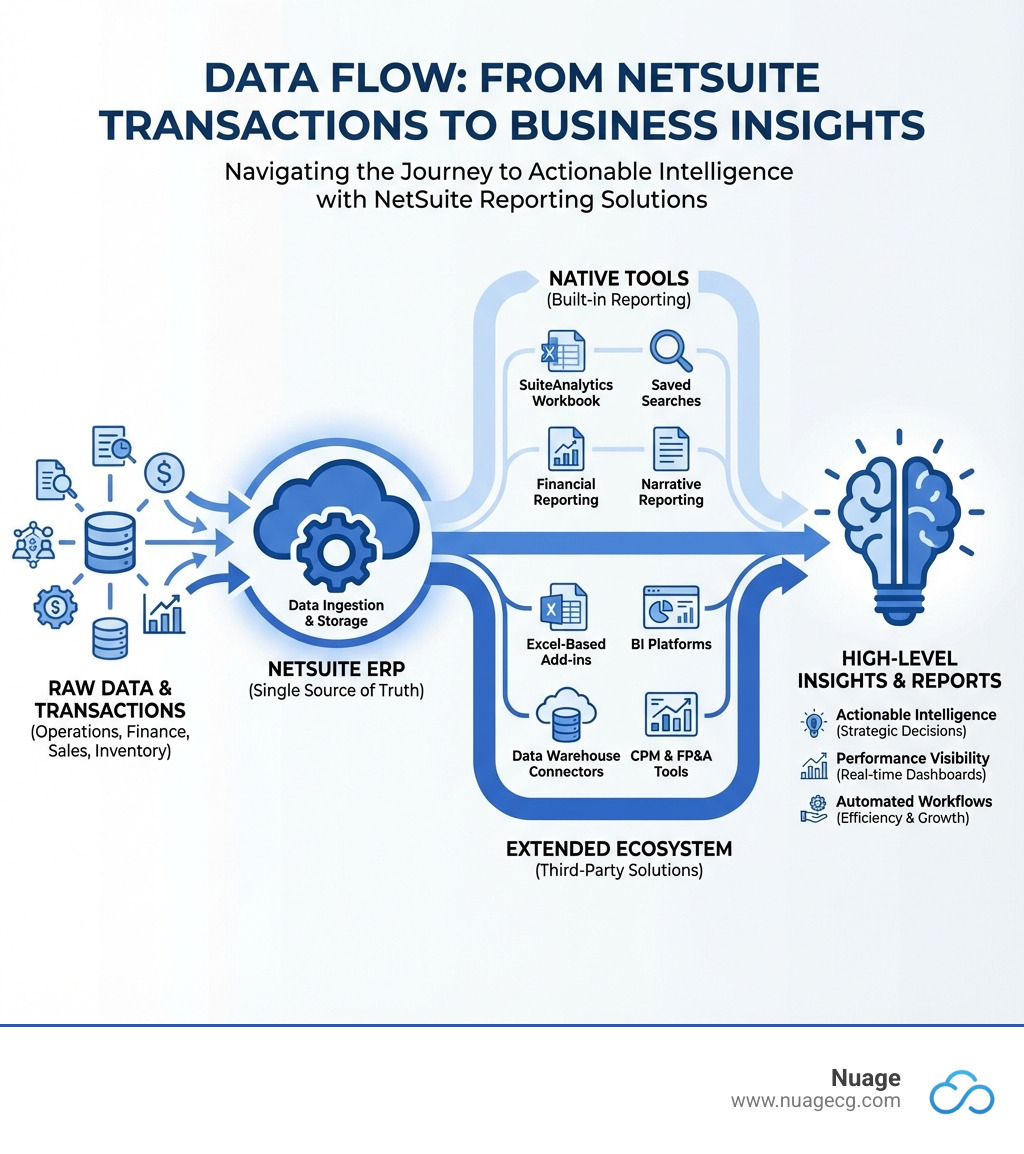
NetSuite reporting capabilities: what tools does NetSuite include?
These NetSuite tools read from the same transaction records your team posts every day. What each user can see and run follows their role permissions.
- Standard reports: prebuilt financial, sales, inventory and other reports. You can customize a standard report to change its columns, filters and layout.
- Financial reports: the income statement, balance sheet, cash flow statement and trial balance, which you can tailor with filters and grouping.
- Saved searches: queries you define with criteria and result columns, without writing code. Results can be exported or shown on a dashboard, and a saved search can send email notifications when records meet its criteria.
- SuiteAnalytics Workbook: pivot tables and charts built from NetSuite records, which can be placed on a dashboard.
- Dashboards: role-based home pages built from portlets that show KPIs, report snapshots and saved search results. Our guide to NetSuite dashboards covers how to build and publish them.
- SuiteAnalytics Connect: database access that lets outside BI tools and data warehouses query NetSuite data. Ask your account team whether your subscription includes it.
What is advanced reporting in NetSuite?
Advanced reporting in NetSuite means reports and searches that carry logic your business defines, on top of the standard set. It usually combines a customized report, a saved search with a formula, a Workbook pivot and a dashboard that publishes the results to a role. Oracle’s help on formulas in searches says a formula is calculated each time the search runs and can use field IDs, SQL functions and mathematical operators. A search can then return a margin percentage or the number of days an invoice is overdue without a custom field to store it. Each formula expression is limited to 1,000 characters, so a long calculation may need to be built in parts.
Advanced data reporting that combines NetSuite with other systems usually moves to SuiteAnalytics Connect and an outside BI tool or data warehouse. The comparison table further down shows where each option fits.
How do you create a custom report in NetSuite?
Oracle’s help on creating a new report describes this path:
- Go to Reports > New Report and select a metric, which is the kind of data the report covers.
- Enter a title and choose a format. Summary, the default, shows roll-up totals with a subtotal for each grouping value. Detail adds the individual records or transactions beneath those totals. Matrix shows subtotals both down and across, and needs a column to use as the matrix dimension.
- Select More Customization to open Report Builder, where you add filters, sorting and columns and set display options.
- Run the report and compare its totals with a standard report before you share it.
Financial statements use a separate tool. Oracle’s FAQ on the difference between Report Builder and Financial Report Builder says Financial Report Builder customizes financial statements such as the income statement, balance sheet, cash flow statement and budget reports, and adds an Edit Layout page for the grouping, order and format of sections and rows. Report Builder customizes the other reports. For a list of records or a line-level export, a saved search is usually the better fit. Once a report works, our guide to automating NetSuite reporting covers running it on a schedule.
NetSuite financial reporting for controllers
Financial reports can be broken out by the segments assigned to transactions, such as department, class, location or subsidiary. A user can drill from a summary line down to the transactions behind it, and report snapshots put key figures on a dashboard. NetSuite’s overview of financial reporting describes the standard set.
Companies that report under more than one accounting standard, such as GAAP and IFRS, can keep separate books with NetSuite’s Multi-Book Accounting feature. For board and investor packages, NetSuite Narrative Reporting, part of NetSuite’s EPM offering, combines financial statements and charts with written commentary in one report that several authors can work on, with review and sign-off stages before it is published. Oracle’s Narrative Reporting overview describes the workflow. Ask your account team which of these your subscription includes.
What is NetSuite Advanced Financials?
NetSuite Advanced Financials is a module. Oracle’s Help Center lists it as a requirement for the Expense Commitments and Budget Validation SuiteApp and says to contact your NetSuite account manager to enable it. Oracle documents several related accounting features in their own topics. Budgets can be compared with actuals in reports such as Budget vs. Actual. Expense Allocation lets you move fixed expenses to departments, classes or locations after they are incurred. Amortization schedules spread an expense across several periods, and a statistical account can set the weight for a dynamic allocation.
Which of these your account uses, and which come with the module under your agreement, is a question for your account manager. Teams that want driver-based forecasts or scenario models beyond budgets in the ledger often add a planning tool.
What is the best reporting tool for NetSuite?
The best tool depends on who builds the reports and where the data lives. For month-end financial reporting, start with the native tools, because they read posted transactions directly and keep the drill-down to source records. The table compares the main options.
| Option | Good fit for | What to plan for | Usually run by |
|---|---|---|---|
| Native reports and saved searches | Financial statements, GL detail, operational lists and email alerts | Report definitions and search filters need an owner as the account grows | Controllers, accountants and NetSuite administrators |
| SuiteAnalytics Workbook and dashboards | Pivot analysis, charts and KPIs on each role’s home page | Each role needs its own layout, and someone has to keep the searches behind it current | Finance and operations managers |
| Excel add-ins | Modeling and board packs in a familiar spreadsheet, with NetSuite data refreshed into the workbook | Formulas built in the workbook sit outside NetSuite, so version control and reconciliation need a process | FP&A and finance teams |
| BI platforms | Visual dashboards that combine NetSuite data with CRM and other business systems | A connector and a data model to maintain; whether a figure links back to the NetSuite transaction depends on the setup | Executives and analysts |
| Planning (CPM and FP&A) tools | Budgeting, forecasting, consolidation and scenario planning | An implementation project and a defined sync of NetSuite actuals | FP&A teams and corporate controllers |
| Data warehouse, through SuiteAnalytics Connect or an ETL tool | Large-scale analysis across many data sources | SQL and data-modeling skills, plus another system to run | Data engineers and analysts |
Our guide to NetSuite budgeting and planning covers the planning tools in more depth.
Four questions narrow the choice:
- Who builds and maintains the reports: the finance team and a NetSuite administrator, or a data team?
- Does the report need only NetSuite data, or data from other systems as well?
- Does an auditor or reviewer need to trace each figure back to a transaction?
- How often does the report run, and does it need to go out on a schedule?
What are the limitations of NetSuite reporting?
NetSuite reports and searches have working limits, and Oracle publishes them. Oracle’s page on size limits for report and search results says report results are truncated above 25,000 rows for most reports, and above 75,000 rows for a listed set that includes ad hoc reports, the General Ledger, the Balance Sheet and the Income Statement. Search results are limited to 10 MB, which is about 20,000 rows and 50 columns of data when exported to CSV. Oracle says the limits are enforced for performance reasons, and for a result that is too large it suggests filtering the data, shortening the date range or considering SuiteAnalytics Connect.
Teams usually respond in three steps:
- Narrow the result. Shorten the date range or add a filter such as subsidiary or department, so the report returns the rows the reader needs.
- Schedule the long runs. A report or search that takes a while can run on a schedule instead of during the working day.
- Move large analysis out of the report. A data warehouse fed through SuiteAnalytics Connect suits questions that span years of history or other systems.
Finance teams add another tool when a question needs more than one report can hold, such as a figure that combines NetSuite with CRM data, spreadsheet modeling, or years of history. The table above shows which category fits which job. The figures in an outside tool still come from the transactions posted in NetSuite.
How do finance teams handle recurring or non-standard NetSuite financial reports?
Most of the reporting work we see is solved inside NetSuite. We classified 3,241 client support tickets Nuage handled between February 2023 and July 2026, and 296 of them were about reports, saved searches and dashboards. In 200 of those 296, the fix was a change to settings or to a search or report definition, with no new code. These three requests show what that work looks like.
A controller who wanted to build her own GL reports
A controller at a utility services company wanted a GL with income and expense opening balances at zero, and asked: “I want you to walk me through it so that I learn how to customize the reports rather than you setting up the custom report.” In one working session we built custom GL balance sheet and income statement reports with a drill-down by accounting period, and the request closed seven days after it was opened.
A quarterly GL export that reruns from saved parameters
A life sciences controller asks us for the same export every quarter: the GL transaction detail for the quarter, run with the prior quarter’s parameters, plus a parameters tab and screenshot with the run date for the audit file. His standing instruction is “Take care with the parameters, we sometimes don’t get this right the first time.” The Q4 2025 export closed 15 days after his request, and the Q2 2026 export went back four days after he asked. Our guide to the NetSuite general ledger detail report explains how that report is built.
An Excel operating-expense dashboard recreated in NetSuite
An energy developer asked us to recreate an operating-expense dashboard that lived on an Excel tab, showing spend by month and by controllable cost type. In review, the dashboard returned no data for some entities, and our consultant traced it to a budget-category filter that matched only one budget and to two subsidiary filters that conflicted. The conflicting filter was removed and the report retested before the next review.
How AI fits into NetSuite reporting
Oracle has added generative AI to its reporting tools. Oracle’s documentation describes NetSuite EPM features that draft a written summary of a variance or other insight for a finance user to review. Oracle also announced NetSuite Next in October 2025, with an assistant called Ask Oracle that answers questions about NetSuite data in plain language. Which of these your account can use depends on your subscription and release, so confirm with your account team.
AI answers draw on the same records and definitions as your reports. If transactions are missing a department or a saved search filters out a subsidiary, an AI summary built on that data carries the same gap, so the report definitions still need an owner.
How Nuage approaches NetSuite reporting
In recent reporting projects, our team has worked through requests in this order:
- Start from the report the person uses now. It might be a NetSuite report or a spreadsheet tab, and we ask which close or audit it supports.
- Run the standard report first. We find where its logic differs from what the controller needs, such as income and expense accounts that should open at zero.
- Build the smallest change that answers the request. Usually that is a saved search or a custom report definition, and sometimes only a settings change. We retest it with the user and record the parameters so the next run matches.
- Walk the finance user through the build when they want to maintain the report themselves.
Our team does this work as part of ongoing NetSuite optimization and managed services.
NetSuite reporting FAQ
What reporting, dashboard and analytics capabilities does NetSuite support for finance teams?
NetSuite includes standard and custom financial reports, saved searches, SuiteAnalytics Workbook for pivots and charts, and role-based dashboards with KPIs and report snapshots. Reports read directly from posted transactions, and users can drill from a summary figure to the transactions behind it. For analysis in outside BI tools or a data warehouse, SuiteAnalytics Connect provides database access; confirm with your account team whether your subscription includes it.
Where does NetSuite reporting need extra setup?
Extra setup usually comes from reports that need logic the standard version does not apply, such as a GL with income and expense opening balances at zero, or a dashboard whose filters have to match how budgets and subsidiaries are set up. In our support work, most reporting requests are solved by changing settings or a search or report definition, with no new code. Teams add outside tools when they need data from other systems or spreadsheet modeling.
Can NetSuite Next replace manual reporting?
Oracle announced NetSuite Next in October 2025, with an assistant called Ask Oracle that answers questions about NetSuite data in plain language. That helps with one-off questions. Recurring reports, such as the month-end package and audit exports, still depend on report and search definitions that someone owns and tests. Ask your account team when NetSuite Next will be available in your account and which features it includes.
What is the difference between a NetSuite report and a saved search?
A report summarizes data in a set layout, such as an income statement or an aged receivables report, and you customize it by changing columns, filters and layout. A saved search is a query you define with criteria and result columns, which suits lists of records and line-level exports. Saved searches can also feed dashboard portlets and send email notifications.
When does a NetSuite report need bespoke development?
Most reporting changes are settings or report and search definitions. In our support work, 200 of 296 reporting tickets were resolved that way, with no new code. Bespoke development, such as a script or an integration, is for requirements that formulas and filters cannot hold, like pulling in data from another system. In recent reporting projects, our team has started with the smallest change that answers the request.
About the author
Louis Balla is Chief Revenue Officer at Nuage, a NetSuite optimization partner that has served 250+ clients since 2011 and holds a 4.9 out of 5 rating on Clutch. The client reporting projects in this article are the work of Nuage’s NetSuite experts.


