

Why NetSuite Optimization Matters for Your Business
NetSuite Optimization is the process of fine-tuning your ERP system to maximize speed, efficiency, and business value. It involves analyzing performance bottlenecks, streamlining customizations, automating workflows, and ensuring your system scales with your growth.
Quick Answer: What is NetSuite Optimization?
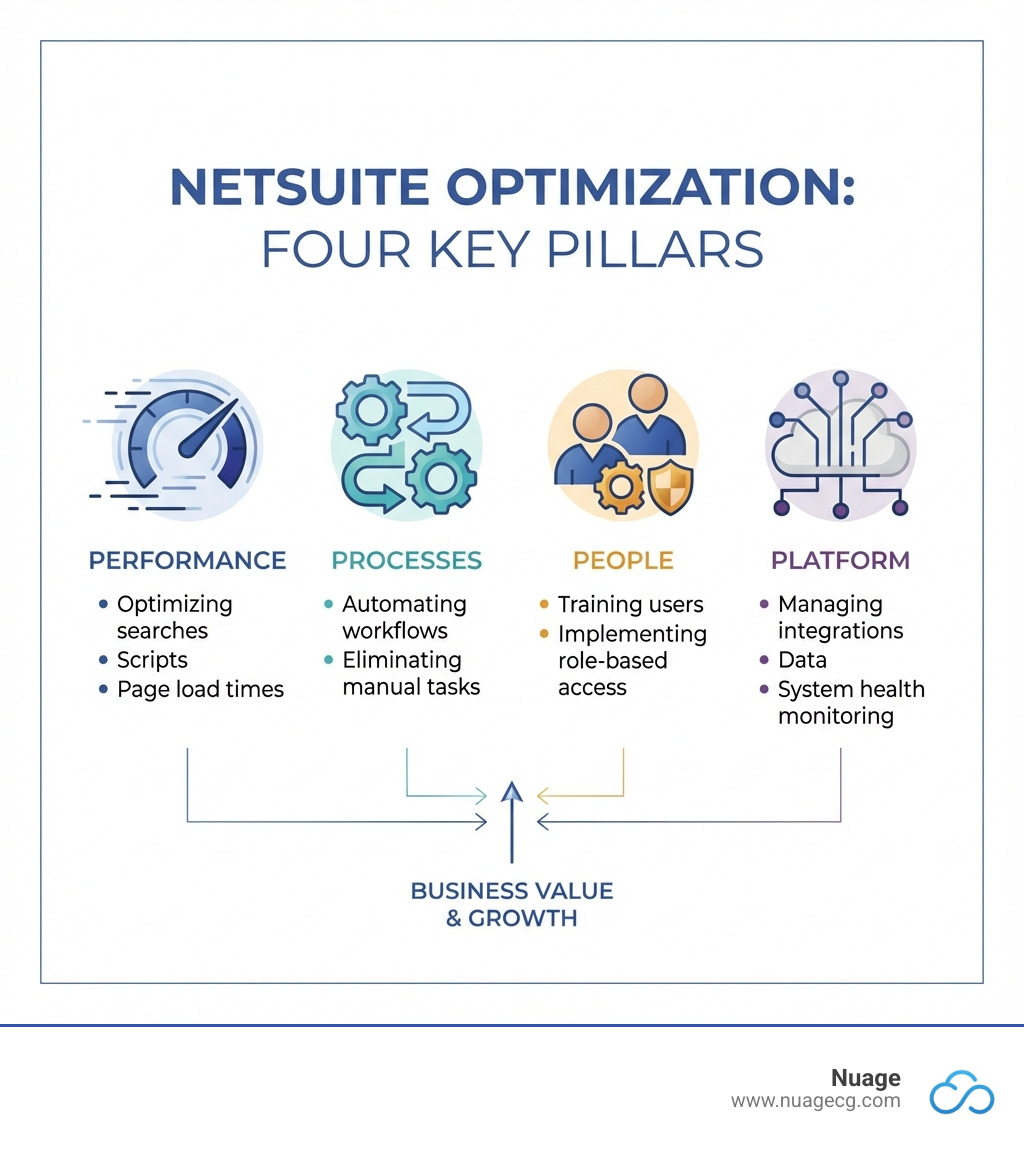
- Performance Tuning: Speeding up page loads, searches, and reports by optimizing scripts, workflows, and saved searches
- Process Automation: Eliminating manual workarounds and leveraging NetSuite’s built-in automation features
- Data Management: Archiving old records, removing duplicates, and maintaining a clean, indexed database
- Integration Efficiency: Streamlining connections with third-party apps and ensuring real-time data sync
- User Enablement: Training teams and configuring role-based access to improve adoption and productivity
Is your NetSuite system helping your team move faster—or slowing everything down?
Many businesses invest in NetSuite to streamline operations, but somewhere along the way, workarounds become the norm. Finance teams wait 10+ seconds for month-end reports. Sales dashboards lag. Warehouse staff resort to spreadsheets. These aren’t just minor annoyances—they’re symptoms of a system that’s no longer optimized for your business.
According to Oracle, over 80% of businesses that adopt cloud ERP report improved efficiency and streamlined processes. But those benefits only materialize when your NetSuite environment is properly tuned. Without regular optimization, customizations pile up, data bloats, and performance degrades. What started as a powerful platform becomes a bottleneck.
The stakes are high. Poor performance doesn’t just frustrate users—it impacts your bottom line. Slow financial closes delay decision-making. Inefficient order processing slows cash flow. Manual workarounds increase errors and operational costs. Over time, these issues compound, limiting your ability to scale and compete.
The good news? NetSuite optimization open ups the full potential of your ERP investment. By addressing performance issues, automating key processes, and implementing smart data management, you transform NetSuite from a basic system of record into a strategic growth engine. Optimized systems support faster decision-making, improve team productivity, and scale effortlessly as your business expands.
I’m Louis Balla, CRO and partner at Nuage, with over 15 years of experience in digital change and supply chain optimization. I’ve spent my career helping companies bridge the NetSuite divide through strategic NetSuite Optimization, ensuring their ERP systems evolve with their business needs. Throughout this guide, we’ll walk through the common causes of poor performance, proven optimization strategies, and advanced techniques to keep your system running at peak efficiency.
For more on how NetSuite can transform your business, visit our NetSuite solutions page.
Diagnosing the Problem: Common Causes and Key Metrics
Before we can fix something, we need to understand what’s broken, right? Think of your NetSuite system like a high-performance car. When it starts sputtering, you don’t just randomly poke under the hood. You diagnose the problem. The same goes for NetSuite Optimization. We start by identifying performance bottlenecks, which can lurk in various corners of your system. These can manifest as front-end issues, like slow-loading dashboards or reports, or back-end problems, often tied to inefficient scripts or bloated integrations. Proactive monitoring is our diagnostic tool, helping us pinpoint exactly where the system is struggling.

Common Causes of Poor NetSuite Performance
It’s a common scenario: you invest in NetSuite to streamline operations, but over time, it starts to feel sluggish. What gives? Often, the very customizations designed to improve your system become its biggest culprits.
One of the main causes of performance challenges in NetSuite is customization within the application itself. While customization is a powerful feature, enabling features, adding scripting, additional workflows, and numerous form and field additions can increase load times. Each layer of business logic, if not carefully managed, can add milliseconds or even seconds to every transaction. This might not seem like much, but these delays compound quickly across high-volume environments, turning minor hiccups into major headaches.
Here are some common culprits we often uncover:
- Overused Customizations and Inefficient Scripts: Every custom field, form, and SuiteScript adds complexity. If scripts are poorly written, execute inefficiently, or are no longer needed but remain active, they can significantly slow down your system. For instance, a user event script taking more than 1,000 milliseconds to execute should be immediately reviewed or moved to a scheduled script to avoid impacting real-time user interactions.
- Bloated Saved Searches: Saved searches are incredibly useful, but if they are too broad, use resource-intensive operators like “contains,” or pull excessive data, they can become performance hogs. Imagine trying to find a needle in a haystack where the haystack keeps growing!
- Unused Workflows: Workflows are fantastic for automating processes. However, obsolete or overly complex workflows that trigger unnecessarily can slow down record transactions and background processing. We’ve seen instances where disabling just a dozen obsolete workflows cut page load times by a third.
- Data Bloat and Duplicate Records: As your business grows, so does your data. Large volumes of inactive data, duplicate records, or unmanaged historical information can strain your system’s caching, indexing, and record loading capabilities. Poor data quality indirectly impacts performance by inflating record counts and complicating searches.
- Integration Overload: Many businesses integrate NetSuite with other systems like Salesforce for unified customer information or HubSpot for marketing insights. While essential, poorly optimized third-party integrations that call NetSuite too frequently, transfer large payloads, or run during peak hours can create significant load and slow down your ERP.
- Improperly Configured User Roles: NetSuite checks user permissions for every action. If user roles have overly broad permissions, such as “See All” access on many tabs, the system spends more time evaluating data, leading to slower page loads.
Key Performance Metrics to Monitor
To truly understand your NetSuite system’s health, we need to look at specific metrics. These aren’t just numbers for IT; they provide critical insights into how your business operations are flowing. The three core performance metrics we focus on are:
- Response Time: This measures how long it takes for a page, transaction, or record type to load. It’s a direct indicator of user experience. If users are waiting 5+ seconds for common tasks, we have a problem.
- Concurrency: This refers to the number of simultaneous transactions, users, or integration threads your system can handle effectively. If you have many users or integrations hitting the system at once, and concurrency is low, things will grind to a halt. For example, a standard NetSuite account without SuiteCloud Plus has a default integration concurrency limit of 5. Adding SuiteCloud Plus licenses can significantly increase this capacity.
- Throughput: This metric represents the total volume of data processed over a given period. It tells us how much work your NetSuite system is actually getting done. Low throughput often points to bottlenecks in data processing or integration.
By regularly monitoring these metrics, we can catch performance issues early, often before they significantly impact user productivity or business operations.
Core Strategies for NetSuite Optimization
Now that we’ve diagnosed the common ailments, let’s talk about the remedies. NetSuite Optimization isn’t about one magic bullet; it’s about applying a series of targeted strategies to improve every facet of your system. Our goal is to make your NetSuite instance a lean, mean, data-processing machine.

Optimizing Saved Searches, Reports, and Dashboards
Saved searches, reports, and dashboards are the windows into your business data. But if those windows are foggy, or too numerous, they can slow everything down. We always start by cleaning them up.
- Filter Aggressively: Don’t ask NetSuite to sift through your entire database if you only need a subset of information. Use specific filters to narrow down results.
- Use Summary Searches: Instead of pulling every single raw record, use summary searches (grouping functions) when you only need aggregated data. This significantly reduces processing load.
- Limit Result Rows: If a search returns thousands of rows but you only ever look at the first 50, limit the results.
- Avoid ‘Contains’ Operator: The ‘contains’ operator is a resource hog. Whenever possible, use more efficient operators like ‘starts with’ or ‘has keywords’.
- Schedule Heavy Reports: For complex or lengthy reports that don’t need real-time data, schedule them to run during off-peak hours and be emailed automatically. This frees up system resources during business hours.
- Clean Up Dashboard Portlets: Dashboards should provide quick insights, not slow page loads. Minimize the number of portlets, especially those based on complex saved searches. If a portlet takes too long to load, consider replacing it with a SuiteAnalytics Workbook.
- Leverage SuiteAnalytics Workbooks: For more flexible and efficient data analysis, especially for complex reporting needs, SuiteAnalytics Workbooks often outperform traditional saved searches.
- KPIs are Your Friends: NetSuite provides over 75 built-in KPIs that you can add to your dashboard. Customize these to highlight the most critical information for each role, reducing the need for custom, potentially slow, searches.
For more about how you can leverage these tools, learn more about NetSuite reporting and analytics.
Streamlining Workflows and SuiteScripts
Workflows and SuiteScripts are the automation engines of your NetSuite system. When they’re tuned correctly, they boost your operations. When they’re not, they can create significant drag.
- Audit and Disable Unused Workflows: Over time, workflows become obsolete. We recommend a regular audit to identify and disable any workflows that are no longer serving a purpose. Even inactive workflows can sometimes add overhead.
- Consolidate Workflow Steps: Simplify complex workflows by consolidating steps where possible. A lean workflow is a fast workflow.
- Move Heavy Logic from Client Scripts to Scheduled Scripts: This is a big one! Client scripts run in the user’s browser, impacting their real-time experience. For tasks that don’t require immediate user interaction—like batch updates, complex field calculations, or data syncs—move the logic to scheduled scripts. These run server-side, offloading the processing and boosting overall system performance. A general rule of thumb: if a user event script takes more than a second, it’s a candidate for a scheduled script.
- SuiteScript 2.1 Best Practices: If you’re still running older SuiteScript versions, consider migrating to SuiteScript 2.1. It offers performance improvements and modern development practices. Always write scripts with performance in mind, minimizing loops, optimizing search queries, and leveraging built-in NetSuite functions.
- Monitor Governance Usage: SuiteScript has governance limits to prevent any single script from monopolizing system resources. Regularly review script execution logs to ensure your scripts are operating within these limits and not causing unexpected delays.
Managing Customizations and Third-Party Integrations
Customizations and integrations are powerful, but like any powerful tool, they require careful management. Too many, or poorly implemented, can create bottlenecks.
- Review and Refactor Customizations Quarterly: Don’t let customizations become “set it and forget it.” Conduct regular audits (quarterly is a good rhythm) of custom Suitelets, user events, and record types. Look for redundancies, inefficiencies, or outdated logic.
- Remove Outdated Scripts and Unused Custom Fields: If a script is no longer needed, disable or delete it. The same goes for custom fields. Each unused field adds to your database’s complexity and can slow down searches and record loads.
- Audit Third-Party Applications: Just like internal customizations, external integrations need a health check. Regularly review and remove outdated or underused connections.
- Batch Integration Data Syncs: Real-time integrations are great for critical data, but not everything needs to be instant. For large data transfers, use batch processing or incremental updates during off-peak hours. This minimizes the load on your NetSuite system.
- Use Efficient APIs like RESTlets: When building integrations, leverage NetSuite’s RESTlet or SuiteTalk APIs. These are designed for scalable and performance-friendly integrations, ensuring data moves efficiently without bogging down your system.
We understand the complexities of connecting NetSuite to your broader tech stack. That’s why we offer specialized NetSuite integration services. For example, integrating with leading CRMs like Salesforce requires thoughtful planning to ensure unified customer information without performance degradation.
Implementing Smart Data and User Management
Your data is the lifeblood of your business, and your users are its pulse. Managing both smartly is key to sustained NetSuite performance.
- Data Archiving Strategies: As your business accumulates data, it’s crucial to have a strategy for archiving historical information. While NetSuite doesn’t have a “cold storage” feature, you can implement processes to move old, less-accessed data out of your active database. This keeps your system lean and responsive.
- Purging Historical Data: Beyond archiving, sometimes data simply needs to be purged. This could be old, irrelevant records that no longer serve a business purpose.
- Data Deduplication Processes: Duplicate records—whether for customers, vendors, or items—can inflate your database and complicate searches. Implement regular deduplication processes to keep your data clean and accurate.
- Proper Field Indexing: NetSuite automatically indexes key fields, but if you frequently use custom fields in searches or reports, ensure they are marked as indexed. This significantly speeds up query performance.
- Implement Role-Based Access Control: This isn’t just about security; it’s about performance. Customize user roles so individuals only have access to the data and functionalities they need. This reduces the amount of data NetSuite has to evaluate when a user interacts with the system, leading to faster page loads and improved security.
- User Enablement and Training: A well-optimized system is only as good as its users. Provide role-specific NetSuite training and ongoing support. When users understand best practices—like how to create efficient searches or use dashboards effectively—they contribute to overall system performance.
- Adjust User Preferences: Encourage users to optimize their personal NetSuite preferences. Simple tweaks like enabling “Delay Loading of Sublists” (which defers data retrieval until a user clicks a subtab) or setting “Maximum Entries in Dropdowns” to 50 or fewer can noticeably speed up page load times.
Advanced Techniques and Continuous Monitoring
Once you’ve tackled the core optimization strategies, it’s time to lift your game. NetSuite Optimization is an ongoing journey, not a one-time destination. This section digs into advanced techniques and emphasizes a culture of continuous improvement, ensuring your NetSuite system remains a powerful asset.
Leveraging NetSuite’s Performance Monitoring Tools
NetSuite offers a suite of powerful tools to help us keep a close eye on system performance. These are our eyes and ears, helping us identify and pre-empt issues.
- Application Performance Management (APM): This is your command center for NetSuite health. APM provides real-time insights into account health, script execution times, queue depths, and more. It allows us to drill down into granular runtime metrics to pinpoint exact bottlenecks.
- Script Execution Logs: Found under Customization > Scripting > Script Debugger, these logs are invaluable for understanding how your SuiteScripts are performing. We can filter by script or role and see usage units and execution times, quickly identifying any scripts that are consuming excessive resources.
- Performance Details Pop-up: A simple yet powerful tool. Double-clicking the NetSuite logo on any page reveals a “Performance Details” window. This breaks down page load time into server processing time versus network/client-side time. This helps us understand if a slowdown is due to NetSuite’s server, your network, or your local machine.
- Official Guide for Optimizing NetSuite Performance: Oracle provides extensive documentation. We always recommend consulting the official guide for Optimizing NetSuite Performance for detailed best practices and technical guidance directly from the source.
- SuiteAnalytics Workbooks: As mentioned earlier, Workbooks aren’t just for reporting; they’re a performance tool. They can often provide more efficient data analysis than complex saved searches, especially for real-time dashboard components.
Explore our NetSuite optimization services to see how we can help you leverage these tools effectively.
Advanced NetSuite Performance Tuning
For those deep-seated performance issues, we sometimes need to bring out the heavy artillery. These advanced techniques dive deeper into how NetSuite interacts with its underlying infrastructure.
- SuiteScript Caching Mechanisms (N/cache): For frequently accessed data within your SuiteScripts, leveraging NetSuite’s caching mechanisms (
N/cachemodule) can significantly improve execution speed by reducing redundant database calls. Why fetch the same data repeatedly if you can store it temporarily? - Database Indexing and Partitioning Strategies: While NetSuite handles much of the database management, we can influence performance by ensuring that custom fields frequently used in searches are indexed. For extremely large tables, understanding database partitioning strategies can help, though this is often managed at NetSuite’s infrastructure level. The key is to optimize your queries and data access patterns to make the most of the underlying database.
- Conducting Load Testing in a Sandbox Environment: Before rolling out major changes or new functionalities, we always recommend conducting load testing in a sandbox environment. This simulates high user concurrency and transaction volumes, allowing us to identify potential bottlenecks under stress without impacting your live production system.
- Reviewing System Notes for Recurring Errors: System notes and audit trails are not just for compliance; they’re a treasure trove of performance insights. Regularly reviewing them for unusual activities or recurring errors can flag patterns that indicate underlying performance issues, such as frequent DML operations that might lock tables or repeated integration failures.
The Business Impact of an Optimized NetSuite Environment
So, why go through all this effort? Because the benefits of an optimized NetSuite system ripple through every part of your business. It’s not just about speed; it’s about open uping strategic value.
- Improved Core Processes: From Procure-to-Pay (P2P), where optimization leads to vendor pricing consistency and automated invoice processing, to Order-to-Cash (O2C), which sees accelerated fulfillment with real-time inventory and shipping automation. And let’s not forget Record-to-Report (R2R), where automation of journal entries and reconciliations brings greater accuracy and supports regulatory compliance. These improvements directly translate to a smoother, more efficient operation.
- Increased User Productivity: When pages load quickly, searches return results instantly, and workflows hum along, your employees spend less time waiting and more time doing valuable work. This boosts morale and productivity across the board.
- Reduced Operational Costs: By eliminating manual workarounds, automating repetitive tasks, and streamlining processes, you cut down on labor costs and reduce errors that can be expensive to fix.
- Better Data-Driven Decision-Making: An optimized NetSuite means real-time, accurate data at your fingertips. Leaders can access customized dashboards and reports that turn raw data into actionable intelligence, enabling quicker, smarter business decisions.
- Maximizing Your NetSuite Investment: NetSuite Optimization ensures you’re getting the most out of your ERP investment. You’re not just using NetSuite; you’re leveraging its full power to drive growth and achieve your strategic objectives. An optimized system becomes a strategic asset, not just an accounting tool.
Frequently Asked Questions about NetSuite Optimization
We hear a lot of questions about NetSuite performance, and we’re always happy to share our insights. Here are some of the most common ones we encounter:
What are the first signs my NetSuite instance needs optimization?
It’s like your car making a funny noise—you know something’s up. Common symptoms include slow-loading dashboards (the kind that make you want to grab a coffee while they load), reports that time out before they can deliver crucial data, and frequent user complaints about system speed. Another tell-tale sign is an increasing reliance on manual workarounds or spreadsheets outside of NetSuite because the system isn’t performing as expected. These aren’t just minor inconveniences; they’re clear indicators of underlying inefficiencies that are hindering productivity and potentially costing you time and money.
Can I perform NetSuite optimization myself, or do I need an expert?
You absolutely can (and should!) perform many basic optimizations yourself. Cleaning up old saved searches, adjusting user preferences (like delaying sublist loads), and disabling unused workflows are great starting points. Think of it as routine maintenance. However, for more complex issues—such as refactoring intricate SuiteScripts, tackling deep-seated data architecture problems, or resolving integration bottlenecks—seeking expert help is crucial. Without specialized knowledge, attempting these fixes yourself can inadvertently cause further problems or lead to a less-than-optimal solution. We’ve seen it happen, and it’s rarely a fun fix! Experts, like our team at Nuage, bring years of experience and a systematic approach to ensure a comprehensive, long-term solution that avoids unforeseen complications.
How often should I review my NetSuite performance?
NetSuite Optimization is definitely not a “set it and forget it” kind of task. It’s an ongoing process, much like tending a garden. We recommend conducting a high-level performance review quarterly to catch any emerging issues. For a more thorough check-up, a deep-dive audit annually is ideal, especially if you’ve implemented significant changes, like adding a new module, integrating a new third-party application, or onboarding a new business process. Performance in NetSuite isn’t static; it’s a discipline that requires consistent tuning to ensure it remains a high-performing asset for your business.
Conclusion: Your NetSuite Optimization Engine
An optimized NetSuite system is a strategic asset that drives efficiency, supports scalability, and delivers a strong return on investment. By regularly diagnosing issues, implementing core strategies, and embracing continuous monitoring, you transform your ERP from a simple system of record into a powerful engine for growth. Nuage’s team of experts has over 20 years of experience helping companies by acting as their NetSuite Optimization Engine, ensuring the platform evolves with their business. Ready to open up the full potential of your ERP? Learn more about our NetSuite solutions.