

Why Production Capacity Makes or Breaks Your Business
NetSuite capacity planning helps manufacturers balance production demand with available resources to optimize schedules, reduce costs, and meet customer commitments. By comparing production needs against labor, machine, and material availability, businesses can shift from reactive firefighting to proactive resource management.
Every growing manufacturer faces the same challenge: how much production capacity do you actually need? Overestimate, and you’re paying for idle equipment and underused staff. Underestimate, and you’re facing missed deadlines, frustrated customers, and lost revenue.
NetSuite’s cloud-based ERP platform offers integrated capacity planning tools that connect production schedules directly to real-time inventory, financials, and order data. This means you can see exactly where constraints exist, model different scenarios, and make data-driven decisions about resource allocation. Key features are found within the NetSuite Advanced Manufacturing and Demand Planning modules, including Rough Cut Capacity Planning (RCP) and work center utilization tracking.
However, many companies only scratch the surface of NetSuite’s potential, sticking to basic scheduling and missing the strategic advantages of advanced features. This guide walks you through the complete capacity planning toolkit within NetSuite—from core concepts to creating actionable plans. You’ll learn how to identify bottlenecks, optimize resource utilization, and align your licensing strategy with your needs.
I’m Louis Balla, CRO and partner at Nuage, with over 15 years of experience in digital change and supply chain management. I’ve helped dozens of manufacturers optimize NetSuite capacity planning to eliminate production bottlenecks and drive profitable growth. Let me show you how to move from reactive capacity management to proactive strategic planning.
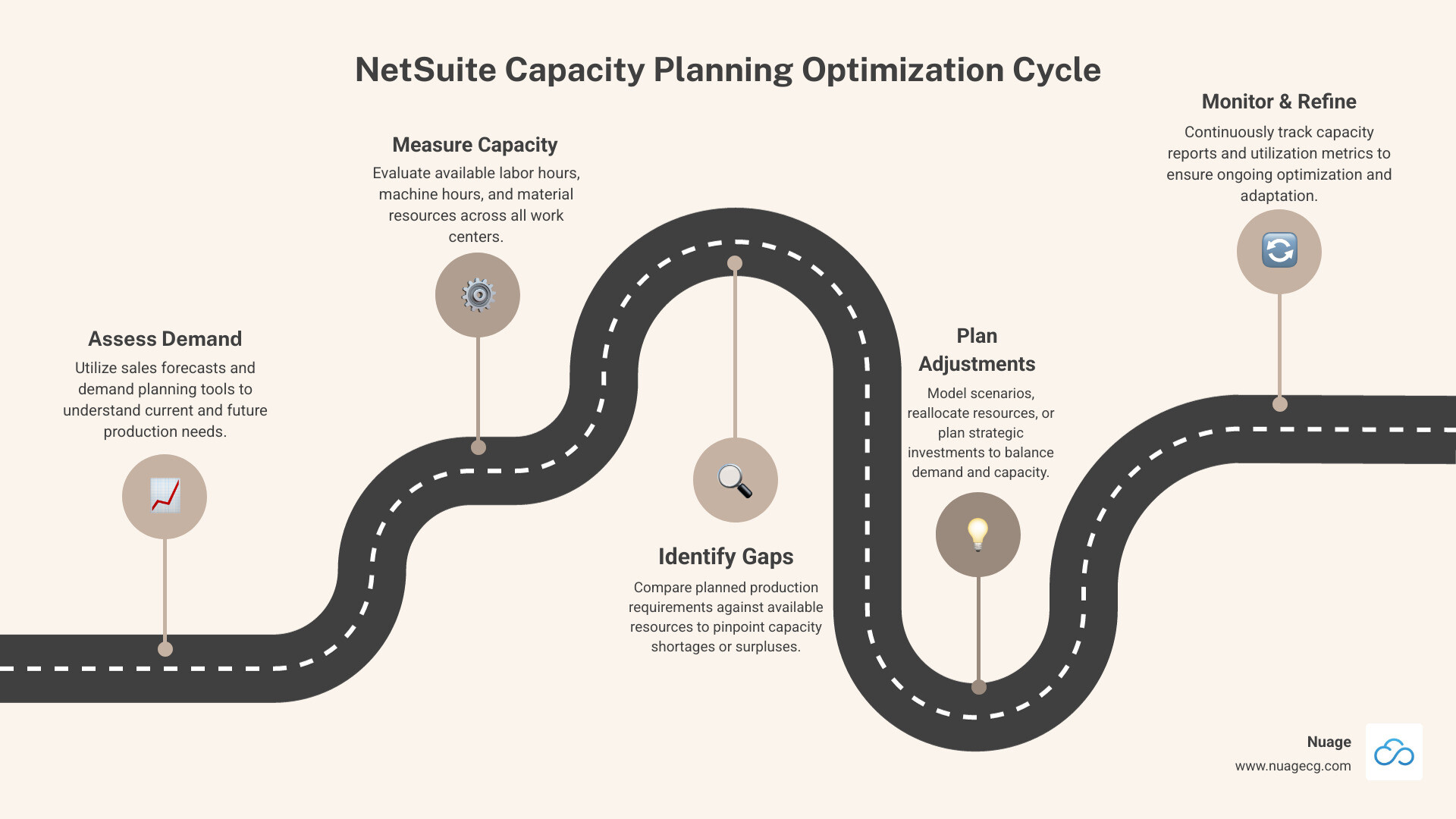
Netsuite capacity planning terms to know:
The High Cost of Unmanaged Capacity: Why Constraints Matter
Imagine your production line as an orchestra. If one musician is out of sync, the entire performance suffers. That’s a capacity constraint—a limitation on resources or speed that restricts your overall output. They are the weakest links preventing your business from achieving its full potential.
While “capacity constraint” and “bottleneck” are often used interchangeably, a constraint implies a more persistent limitation, whereas a bottleneck can be a temporary hiccup.

For manufacturers, managing these constraints is essential for survival. When capacity constraints go unmanaged, the consequences are severe:
- Increased Lead Times: Production slows, leading to longer waits for customers.
- Higher Operational Costs: Expenses rise due to expedited shipping, overtime, and inefficient resource use.
- Lost Revenue: Inability to meet demand sends customers to competitors.
- Reduced Employee Satisfaction: Constant pressure and inefficiency can lead to burnout and high turnover.
- Waste: Unbalanced production flow can result in excess inventory, defects, and overproduction.
Some Yale economic researchers even contend that supply chain bottlenecks have been responsible for half of recent inflationary pressures, highlighting how critical effective capacity planning is for businesses.
To avoid these pitfalls, businesses must avoid common mistakes like poor forecasting, planning in silos, and ignoring non-productive time. As the Computer Measurement Group points out, 85% of startups fail because they don’t analyze and plan for demand. This statistic underscores the universal need for robust capacity planning. You can learn more in our guide on Common Mistakes in Capacity Planning and How to Avoid Them.
Types and Causes of Capacity Constraints
Capacity constraints manifest in various forms:
- Physical Constraints: Tangible limitations like insufficient factory space, a limited number of machines, or lack of storage.
- Resource Constraints: Shortages of skilled labor, inadequate raw material supply (like the global semiconductor shortage), or a lack of specialized tools.
- Time Constraints: Limitations imposed by time, such as a process that takes a fixed amount of time or rigid shift patterns.
These constraints often stem from several common causes:
- Demand Volatility: Unpredictable spikes or drops in customer demand.
- Poor Planning and Forecasting: Inaccurate forecasts lead to misaligned capacity.
- Loss of Resources: Unexpected equipment breakdowns, labor shortages, or supply chain disruptions.
- External Factors: Geopolitical events, natural disasters, or pandemics that disrupt supply chains.
- Outdated Technology: Old, slow, or unreliable machinery that can’t keep pace with modern demands.
Whether your business is involved in ERP for Process Manufacturing or ERP for Industrial Manufacturing, understanding these types and causes is the first step toward effective NetSuite capacity planning.
Core Components of NetSuite Capacity Planning
NetSuite capacity planning isn’t a standalone feature; it’s an integrated capability woven into NetSuite’s comprehensive cloud ERP platform. This unified approach connects your production planning in real-time to every other aspect of your business, from financials to CRM.

At Nuage, we emphasize this integrated approach because it provides a single source of truth. When we help clients implement NetSuite ERP, we ensure manufacturing processes are connected to financial reports, inventory, and orders for proactive decision-making.
The core NetSuite capacity planning functionalities are primarily found within two key add-on modules:
- NetSuite Demand Planning: Helps forecast future inventory needs by analyzing historical data, seasonality, and sales forecasts.
- NetSuite Advanced Manufacturing: Provides tools to translate forecasts into production schedules, including Rough Cut Capacity Planning. For a deeper dive, see our NetSuite Advanced Manufacturing Complete Guide.
Integration with Other NetSuite Modules
The strength of NetSuite capacity planning lies in its seamless integration:
- Financials: Links production plans to cost accounting, budgeting, and revenue forecasting.
- Inventory Management: Considers material availability to prevent stockouts or overstocking.
- Order Management: Optimizes production schedules to meet customer delivery dates.
- CRM: Integrates sales forecasts from NetSuite CRM directly into capacity plans.
- E-commerce: Uses real-time online sales data to inform rapid production adjustments.
This interconnectedness allows for agile and informed adjustments as business conditions change.
Rough Cut Capacity Planning (RCP) for Long-Term Strategy
Rough Cut Capacity Planning (RCP) in NetSuite is a long-term process that helps planners verify that the required capacity is available to meet future production priorities. It’s about looking ahead at next quarter or next year, not just next week.
How RCP Works in NetSuite:
NetSuite’s RCP functionality evaluates production demand against resource availability (labor, machines, work centers) to determine the work center percentage use over a defined period. It can also report on a work center’s remaining capacity and provide estimates for resource demand, which is invaluable for strategic decisions.
Benefits of RCP:
- Scenario Planning: Allows you to model “what-if” scenarios, such as a 20% demand increase, to see the impact on capacity before it happens.
- Identifying Future Needs: Highlights potential capacity shortfalls or surpluses in advance, helping you plan for capital expenditures or hiring.
- Verifying Production Priorities: Ensures your long-term capacity aligns with business goals.
RCP helps you build a resilient, forward-looking production strategy, forming a crucial link with your overall NetSuite Demand Planning efforts.
The NetSuite Production Capacity Planning App
Beyond core RCP, the NetSuite Production Capacity Planning App empowers manufacturers with real-time insights and dynamic control over production schedules.
Key Features of the App:
- Real-time insights into production capacity.
- Automatic, intelligent work order scheduling.
- Load balancing across resources to prevent bottlenecks.
- “What-if” scenario modeling and simulations.
- Forecasting for material and labor availability.
- Proactive bottleneck identification.
- Dynamic resource allocation to adapt to changing conditions.
- Multi-site planning for a consolidated view of operations.
This specialized app extends NetSuite capacity planning capabilities, making it an invaluable tool for any manufacturer looking to optimize their operations, whether you’re a heavy industrial manufacturer or a light manufacturing company.
A Step-by-Step Guide to Optimizing Production with NetSuite
Optimizing production with NetSuite capacity planning is a journey of continuous improvement. As we’ve seen, ignoring planning can be catastrophic; 85% of startups fail because they don’t analyze and plan for demand, according to the Computer Measurement Group.
Here are some best practices for managing capacity constraints:
- Remove Process Bottlenecks: Actively identify and eliminate points in your production process that slow everything down.
- Adopt Lean Principles: Implement methodologies like Total Productive Maintenance (TPM) to streamline operations.
- Eliminate Waste: Focus on reducing all forms of waste, from motion and overprocessing to excess inventory and defects.
- Improve Forecasting: Use NetSuite’s demand planning tools to create more accurate forecasts.
- Use Predictive Maintenance: Employ technology to predict equipment failures and minimize unplanned downtime.
- Cross-Train Employees: Develop a versatile workforce to handle demand fluctuations and resource shortages.
- Invest in Technology: Continuously evaluate and invest in technology like manufacturing automation and advanced planning software.
Beyond these, remember to analyze current resources, prioritize projects, track productivity, monitor risks, and expect change. You can also explore how NetSuite Process Automation Tips 2025 can further improve your efficiency.
Creating a Rough Cut Capacity Plan in NetSuite
Here’s how to create a Rough Cut Capacity Plan (RCP) in NetSuite to build your long-term strategy:
- Steer to Capacity Planning: In NetSuite, go to
Advanced Manufacturing > Capacity Planning > Capacity Planning. - Initiate Plan Creation: Click the ‘Create Plan’ button.
- Define Plan Basics:
- Location: Select the manufacturing location.
- Plan Name: Give your plan a descriptive name (e.g., “Q3 Production Forecast 2025”).
- Plan Type: This determines the demand source for your plan (Work Orders, Sales Orders, or Demand Plan).
- Set the Horizon:
- Horizon Start Date: The beginning of your planning period (must be a Monday).
- Horizon End Date: The end of your planning period.
- Time Fence: Select ‘Week’. A time fence is a boundary that helps minimize disruptions to schedules.
- Save Your Plan: Click ‘Save The Plan’.
Following these steps establishes a foundational RCP for strategic long-term planning.
How to Generate and Use NetSuite Capacity Planning Reports
Once plans are in place, reports provide actionable insights into how effectively targets were met and where improvements can be made.
Here’s how to generate and use these reports:
- Access Reports: Go to
Advanced Manufacturing > Capacity Planning > Capacity Planning Reports. - Select a Plan: Choose a Capacity Plan from the list.
- Display the Plan: Click ‘Display Plan’ to populate the data.
- Choose Report Type: Select the report you need, such as Work Center Planned Production Summary or Work Center Utilization by Period.
- Print Report: Click ‘Print Report’ to generate a printable version.
Key Metrics to Track in Reports:
- Units Planned: The number of items projected for production.
- Planned Labor/Machine Hours: The hours assigned to the plan.
- Available Labor/Machine Hours: The total hours accessible for the plan.
- Planned Labor/Machine Utilization %: The percentage of available hours planned for use.
Using Reports for Improvement:
These reports are invaluable for identifying variances, pinpointing bottlenecks, optimizing schedules, and informing financial planning. For more advanced reporting, you can also explore how to create custom reports in NetSuite.
Aligning Cost and Functionality: NetSuite Licensing for Capacity Planning
Understanding NetSuite’s licensing model is as crucial as understanding its features. Your licensing choices directly impact access, cost, and ROI. Misjudging your license setup is one of the fastest ways to burn through your budget.
NetSuite capacity planning capabilities are primarily found within the optional add-on modules of NetSuite Demand Planning and Advanced Manufacturing. The overall cost of NetSuite is based on an annual license fee composed of three main components:
- Core Platform: The foundation of your NetSuite environment.
- Optional Modules: Specialized functionalities like Advanced Manufacturing.
- Number of Users: Licenses are typically priced per user, per month, based on access level.
NetSuite offers various editions for different business sizes. Your choice can influence the scope of capacity planning you can effectively manage:
| NetSuite Edition | Target Business Size | Capacity Planning Suitability |
|---|---|---|
| Limited | Small businesses (fewer than 10 users, one legal entity) | Basic capacity needs; may require customization for advanced planning. |
| Mid-Market | Growing companies | Good for standard manufacturing capacity planning. |
| Enterprise | High-volume, complex operations | Ideal for extensive, multi-site capacity planning. |
| OneWorld | Global organizations | Essential for global capacity planning across subsidiaries. |
Note: This table provides a general overview. Specific needs should be evaluated against the features of each edition and module.
According to NetSuite, mid-sized companies spend about 3% to 5% of annual revenue on ERP ownership, underscoring the need for a strategic approach to licensing.
Optimizing Your NetSuite Licenses for Cost Control
Optimizing your NetSuite licenses is critical for controlling costs. Many businesses make common mistakes that lead to unnecessary expenses.
Common Licensing Mistakes to Avoid:
- Buying Licenses Based on Headcount, Not Roles: Purchasing full-access licenses for every employee, regardless of their actual needs, is a huge cost driver.
- Ignoring Your License Mix Before Renewal: Failing to audit usage before renewal means you may continue paying for unused or over-licensed features.
- Underestimating Implementation Costs: The license fee is only part of the total investment.
Strategies for Optimization:
- Role Mapping: NetSuite offers different user types (Full, Limited, Self-service). We work with clients to map user roles to the most cost-effective license types, ensuring everyone has the access they need without overspending.
- Strategic Module Selection: Adopt a phased approach, licensing only the modules you need immediately. As your business grows, you can add more. Our NetSuite Software Optimization services often start with this review.
- Regular License Reviews: Conduct a thorough license audit 60-90 days before your contract expires to adjust user counts, re-evaluate module needs, and negotiate terms.
Considering NetSuite? Don’t sign a contract until you understand how licensing works. To avoid overspending and ensure your NetSuite environment is aligned with your business needs, we highly recommend a licensing review. You can schedule a free licensing review with our experts to build a smarter, leaner NetSuite license configuration.
Frequently Asked Questions about NetSuite Capacity Planning
What is the difference between capacity planning and resource planning in NetSuite?
Understanding this distinction is key to effective management.
- Capacity Planning (Strategic & Long-term): This asks, “What resources will we need in the future?” It’s about matching overall supply with anticipated demand over extended periods. In NetSuite, tools like Rough Cut Capacity Planning (RCP) inform strategic decisions like capital expenditures or major hiring initiatives.
- Resource Planning (Tactical & Short-term): This asks, “How do we best use the resources we currently have?” It focuses on the immediate allocation and scheduling of existing resources (people, equipment) for specific tasks. NetSuite’s advanced scheduling and work order management tools facilitate this.
Essentially, NetSuite capacity planning sets the strategic boundaries, while resource planning optimizes day-to-day operations within those boundaries.
How does NetSuite handle both machine and labor capacity?
NetSuite manages both machine and labor capacity comprehensively within the Advanced Manufacturing module. When defining work centers, you can specify both machine resources (e.g., production lines) and labor resources (e.g., operators, skill sets).
For NetSuite capacity planning, the system tracks available hours, planned hours, and utilization rates for both machines and labor. Capacity reports provide detailed metrics like “Planned Labor Hours,” “Labor Hours Available,” and their respective utilization percentages. This dual tracking allows you to identify specific bottlenecks, whether they’re due to an overloaded machine or a shortage of skilled personnel.
Can NetSuite capacity planning be used for non-manufacturing businesses?
Yes. While many dedicated features are in the Advanced Manufacturing module, the underlying principles can be adapted for non-manufacturing businesses, particularly service-based organizations.
- Professional Services Firms: Can use NetSuite to plan for consultant availability and project workload, aligning with workforce capacity planning.
- Retail and E-commerce: Can use demand planning to forecast staffing needs for customer service and warehouse operations during seasonal peaks.
- Healthcare: Can plan for patient intake capacity, bed availability, and medical staff scheduling.
The core idea of balancing demand with available resources is universal. For these businesses, focusing on workforce capacity planning and demand forecasting within NetSuite can provide significant benefits. Even for a small business, planning capacity is crucial for sustainable growth.
Conclusion: From Reactive Firefighting to Proactive Growth
Effective NetSuite capacity planning transforms your operations from reactive firefighting to proactive, strategic growth. By leveraging NetSuite’s integrated tools, you gain the power to optimize production schedules, improve resource utilization, reduce costs, and increase profitability.
The true strength of NetSuite lies in its unified system, providing a single source of truth that connects your production plans directly to your financials, inventory, and customer demand. This holistic view empowers informed decision-making and sustainable growth.
At Nuage, we are your NetSuite Optimization Engine. With over 20 years of experience, our team in Manhattan Beach, CA, Ponte Vedra, FL, and Jacksonville, FL, specializes in helping companies select, implement, and support their NetSuite environment. We partner with you to ensure your ERP investment truly drives your business forward.
Ready to master your production capacity? Explore our NetSuite solutions to see how our optimization experts can help. If you’re looking for expert guidance, our NetSuite ERP Implementation Partners are ready to assist.