
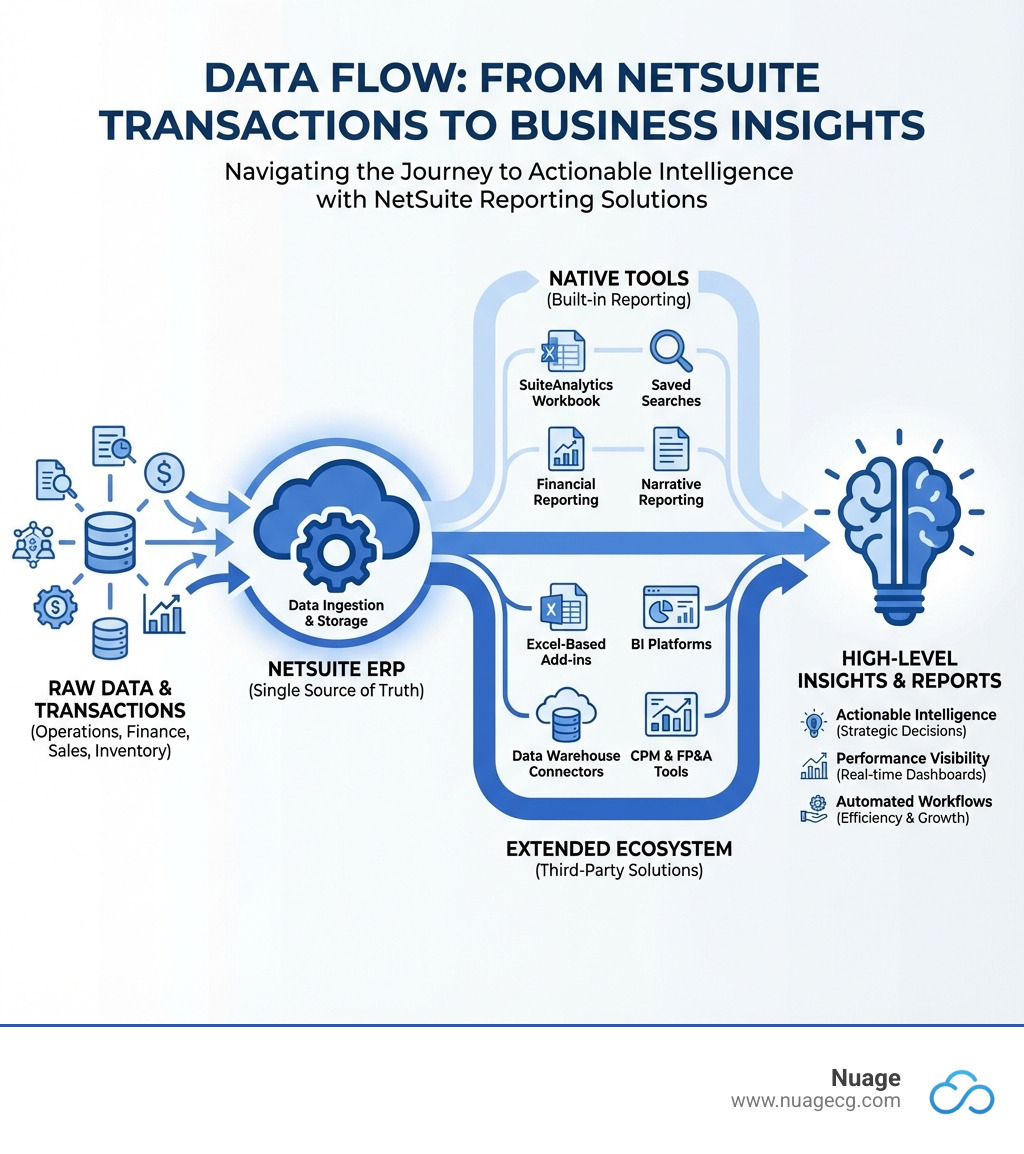
NetSuite Reporting Solutions include native tools built into the platform and third-party applications that extend its capabilities. While NetSuite’s out-of-the-box reporting is powerful, most businesses need additional tools for deeper insights, workflow automation, and multi-source data consolidation.
Quick Overview of NetSuite Reporting Options:
- Native Tools – SuiteAnalytics, Saved Searches, Financial Reporting, and Narrative Reporting.
- Excel-Based Add-ins – Solutions like Solution 7 that bring live NetSuite data into spreadsheets.
- Business Intelligence Platforms – Tools like DOMO and Power BI for visual dashboards and combined data sources.
- CPM & FP&A Tools – Purpose-built solutions like Planful for budgeting, forecasting, and financial consolidation.
- Data Warehouse Connectors – ETL solutions that feed NetSuite data into analytics platforms like Snowflake or BigQuery.
Despite hundreds of standard reports, many finance teams still spend hours manually creating custom reports in Excel. As one controller noted, NetSuite’s automation can be “night and day” compared to manual consolidation, but many businesses still hit a wall. Multi-dimensional reporting can require workarounds, custom views become rigid, and audit trails break once data is exported.
This is where the NetSuite reporting ecosystem comes in. The global ERP software market is estimated to reach $123B by 2030, with much of this growth driven by demand for better analytics that turn raw data into actionable intelligence.
I’m Louis Balla, CRO and partner at Nuage, with over 15 years of experience helping businesses optimize their ERP systems. I’ve seen how the right combination of NetSuite Reporting Solutions can transform a company’s decision-making. Let me walk you through what’s available and how to choose the right tools for your needs.
Opening up Native NetSuite Reporting Capabilities
This section explores the powerful reporting tools included with the core NetSuite platform, which form the foundation for any reporting strategy.
What Are NetSuite’s Core Reporting Tools?
As a comprehensive ERP, NetSuite includes a robust set of native reporting tools with its platform license, providing a central nervous system for your business operations.
NetSuite’s core reporting tools include:
- SuiteAnalytics: An integrated analytics toolset for retrieving, presenting, and analyzing real-time business results. It provides a powerful framework for building complex queries and visualizations. You can see it in action in this NetSuite Analytics overview.
- Saved Searches: These allow you to extract specific information from NetSuite’s database using custom filters and criteria—like overdue invoices or large sales orders. Saved searches provide real-time data, can be exported, and can trigger email notifications, making them invaluable for ad-hoc reporting.
- Standard Reports: NetSuite provides hundreds of pre-built reports for finance, sales, inventory, and more. These can be customized using the Report Builder to fit unique business needs.
- Dashboards: These customizable command centers offer a high-level visual overview of business performance. They use widgets, charts, and Key Performance Indicators (KPIs) to monitor critical metrics, ensuring every team member has access to relevant, real-time data for their role.
Access to these functions is determined by user role permissions, ensuring data security and relevance.
Key Features of NetSuite Financial Reporting
NetSuite Financial Reporting provides the tools to understand the story behind the numbers, equipping finance and accounting teams with powerful capabilities. You can learn more here: What is NetSuite Financial Reporting?.
Key features include:
- Configurable Financial Reports: Users can easily tailor prebuilt financial reports by filtering, grouping, and sorting data to control how information is organized and presented.
- Report Snapshots: These summaries of key report data can be added to dashboards, allowing users to monitor relevant financial details at a glance.
- Multidimensional Analysis: This feature allows for granular evaluation of financial performance by linking characteristics like department, project, or product line to transactions. You can slice and dice data to track metrics by division, territory, or channel and drill down to individual transactions.
- Multiple Reporting Standards & Multi-Book Accounting: NetSuite’s multi-book feature allows businesses to maintain multiple sets of books to comply with various accounting standards (e.g., GAAP, IFRS) and tax requirements, which is crucial for organizations with complex reporting obligations.
The benefits are clear: real-time insights for faster decision-making, time savings through automation, improved communication with consistent data, and tighter control via role-based permissions.
Going Deeper with NetSuite Narrative Reporting
NetSuite Narrative Reporting, an add-on module, bridges the gap between raw data and comprehensive understanding by combining financial statements and charts with rich text explanations in a single, unified report.
Key aspects of Narrative Reporting include:
- Combining Numbers with Context: Embed textual explanations directly alongside financial figures and charts, ensuring stakeholders receive clear, contextualized insights.
- Collaborative Report Building: The tool is built for collaboration, enabling multi-author contributions with user-based access permissions to streamline the report creation process.
- Version Control and Audit Trails: Robust version control and comprehensive audit trails track all changes, ensuring transparency and compliance. You can monitor report progress and approvals with clear status updates.
- Publishing and Distribution: Create Report Books to group and securely distribute finalized content to stakeholders with custom access, ensuring the right people get the right information.
This solution improves data accuracy, accelerates reporting cycles, and delivers clearer insights, significantly reducing the manual effort of traditional report generation. See an overview of NetSuite Narrative Reporting here.
The Role of AI in Modern NetSuite Reporting Solutions
NetSuite’s unified data structure provides an ideal foundation for leveraging Artificial Intelligence to uncover deeper insights and automate complex analysis. We are entering an exciting era where AI is not just a buzzword but a practical tool enhancing our reporting capabilities.
How NetSuite Leverages AI for Financial Insights
As a unified suite, NetSuite centralizes data from all business functions, creating the ideal foundation for AI. Without a single source of truth, AI would analyze fragmented information, leading to unreliable insights. With NetSuite’s unified data, AI can deliver faster, better analysis.
Instead of just presenting numbers, AI helps uncover underlying patterns and anomalies. For example, if a product line’s revenue dips, AI can analyze contributing factors across sales, inventory, and marketing data to pinpoint potential causes.
As Gartner notes, Generative AI (GenAI) in ERP systems helps surface insights and automate actions. You can ask questions in plain language—”Why did our Q3 profit margins decline in the Florida region?”—or spot patterns human teams might miss. AI augments human analysts, allowing them to focus on strategy rather than manual data digging. This is how we transform data into actionable intelligence.
For more on this topic, see what Gartner says about GenAI in ERP systems.
Generative AI in NetSuite Narrative Reporting
The integration of Generative AI into NetSuite Narrative Reporting is a game-changer for finance teams, expediting reporting cycles and adding depth to financial narratives. It generates intelligent, contextual explanations based on live NetSuite data.
Instead of manually writing variance explanations, Generative AI can:
- Automate Narrative Generation: Analyze financial data and automatically generate descriptive text, such as an explanation for a variance that exceeds a predefined threshold.
- Describe Exceptions and Causality: When a condition is met (e.g., a significant sales drop), the AI can generate a narrative describing the exception and suggest potential causes by analyzing related data, like an inventory shortage.
- Perform Comparative Analysis: For reports with comparative data (e.g., actuals vs. budget), the AI can generate narratives highlighting key differences, trends, and their implications.
This capability automates routine tasks, reduces manual effort, and improves the context of reports. It allows teams to focus on deeper strategic analysis, making financial reporting truly intelligent.

Expanding Your Capabilities: Types of Third-Party Reporting Tools
While NetSuite’s native capabilities are robust, many businesses need to expand their toolkit with third-party NetSuite Reporting Solutions. Understanding the different categories helps in choosing the right solution to complement your NetSuite environment.
Excel-Based Reporting Add-ins
Excel-based reporting add-ins integrate live NetSuite data directly into spreadsheets, allowing finance teams to leverage a familiar, flexible tool for analysis and modeling.
- Strengths:
- User Adoption: High adoption due to finance teams’ proficiency in Excel, reducing training overhead.
- Complex Modeling: Ideal for building intricate financial models, what-if scenarios, and custom calculations.
- Real-time Data: Solutions like Solution 7 or JetReports provide live data, eliminating manual exports and ensuring accuracy.
- Weaknesses:
- Logic Outside ERP: Building logic in Excel can create reconciliation challenges if not carefully managed.
- Version Control: Can lead to confusion from multiple report versions without proper governance.
- Broken Audit Trail: The link back to source transactions in NetSuite can be lost, complicating audits.
Business Intelligence (BI) and Visualization Platforms
BI platforms are ideal for creating visually compelling, interactive dashboards and combining NetSuite data with information from other systems (e.g., CRM, marketing automation).
- Strengths:
- Visual Dashboards: Excel at creating engaging, executive-level dashboards that make data easy to consume.
- Combining Data Sources: Tools like DOMO or Grow unify data from NetSuite and external sources for a holistic business view.
- Ease of Use: Many feature drag-and-drop interfaces, empowering business users to build their own reports.
- Weaknesses:
- Lacks Deep Financial Logic: General BI tools may not have the built-in financial intelligence of NetSuite or specialized CPM tools.
- No Drill-Down to ERP: Often don’t link back to NetSuite transactions, breaking the audit trail.
- Cost and Complexity: Setup and maintenance can require significant technical expertise and investment.
Corporate Performance Management (CPM) & FP&A Tools
For sophisticated budgeting, planning, forecasting, and consolidation, CPM and FP&A tools are purpose-built solutions that manage the entire financial performance cycle.
- Strengths:
- Built for Complex Finance: Platforms like Planful are designed for multi-entity consolidation, intercompany eliminations, and statutory reporting (IFRS, GAAP).
- Strong Workflow Features: Include robust workflow and approval mechanisms for controlled, auditable processes.
- Centralized Planning: Replace fragmented spreadsheets with a single, controlled system for budgeting and forecasting.
- Weaknesses:
- Rigidity: Can be less flexible for ad-hoc analysis compared to BI tools or Excel.
- Significant Setup: Implementation often requires specialized consultants and significant configuration.
Data Connectors and ETL/ELT Solutions
For businesses with large data volumes or dedicated data teams, ETL/ELT solutions move NetSuite data into cloud data warehouses (Snowflake, BigQuery) for advanced analytics.
- Strengths:
- Ultimate Flexibility: Gives data teams unparalleled flexibility to model, transform, and combine NetSuite data with any other source.
- Large-Scale Analytics: Ideal for deep dives, predictive analytics, and machine learning applications.
- Continuous Data Movement: Solutions like Striim use Change Data Capture (CDC) for near real-time data replication.
- Weaknesses:
- Requires Technical Expertise: Users need skills in SQL, data modeling, and data warehousing.
- Not a Self-Service Tool: Setup and management are highly technical and not for typical business users.
- Increased Infrastructure: Adds another layer of infrastructure and cost to the tech stack.
How to Choose and Optimize Your NetSuite Reporting Strategy
Selecting the right tools and establishing best practices are crucial for turning NetSuite data into a competitive advantage. It’s about finding the right fit for your needs, team, and goals.
Choosing the Right NetSuite Reporting Solutions
When navigating the landscape of NetSuite Reporting Solutions, we consider several key factors to build an effective and sustainable reporting ecosystem. Here’s a comparative look:
| Reporting Solution Category | Primary Use Case | Ideal User Profile | Integration Depth |
|---|---|---|---|
| Native Tools | Standard financial & operational reports, ad-hoc queries, role-based dashboards | All NetSuite users, especially finance and operations for day-to-day insights | Deep: Built directly into NetSuite, real-time, preserves audit trails |
| Excel Add-ins | Custom financial modeling, complex what-if analysis, familiar spreadsheet environment | Finance teams, accountants who prefer Excel’s flexibility | Medium-Deep: Live data connection, but logic can reside outside NetSuite |
| BI Platforms | Visual dashboards, cross-functional analytics, combining data from multiple sources | Executives, marketing, sales, non-technical users needing visual insights | Medium: Connectors to NetSuite and other systems, often for aggregated data |
| CPM/FP&A Tools | Budgeting, forecasting, financial consolidation, statutory reporting, workforce planning | Finance leadership, FP&A teams, corporate controllers | Deep: Purpose-built connectors for financial data, strong workflow integration |
| Data Connectors/ETL | Large-scale analytics, data warehousing, predictive modeling, big data initiatives | Data engineers, data scientists, advanced analytics teams | Very Deep: Continuous data replication to external data warehouses for analysis |
Assessing Your Needs:
- Reporting Complexity: Are your needs basic (P&L) or complex (multi-entity consolidations, predictive modeling)?
- User Skill Levels: Does your team prefer Excel, visual BI dashboards, or are they comfortable with SQL?
- Data Sources: Do you need only NetSuite data, or must you combine it with data from other platforms?
- Budget and Scalability: Consider initial cost, ongoing maintenance, and potential for growth.
We advocate for prioritizing tools that offer seamless integration and preserve NetSuite’s logic and auditability. “NetSuite-first” SuiteApps often provide faster setup and better alignment.
Best Practices for Building Reporting Workflows
Optimizing your reporting workflows is key to gaining a competitive advantage. Here are our best practices:
- Standardize Key Metric Definitions: Ensure metrics like bookings, churn, and margin have consistent definitions and formulas across all reports to eliminate confusion.
- Combine Related Reports for Context: View related data together, such as project margins alongside resource utilization, for a more holistic insight.
- Ensure Drill-Down Capability for Auditability: Every summary metric must allow drill-down to the underlying transaction-level detail for validation and root cause analysis.
- Automate Report Scheduling and Delivery: Use NetSuite’s scheduling features or third-party tools to deliver reports automatically, saving time and reducing errors.
- Leverage AI for Insights: Use AI capabilities to uncover hidden patterns and augment human intelligence.
- Prioritize Role-Based Access: Implement role-based access control to ensure users only see relevant and permissible data, maintaining security.
How Reporting Drives Business Performance
Investing in robust NetSuite Reporting Solutions is about driving superior business performance and gaining a competitive edge.
- Improving Decision-Making: Real-time, accurate data enables faster, more informed decisions, from optimizing pricing to evaluating new ventures.
- Enhancing Operational Efficiency: Clear visibility into operations helps pinpoint bottlenecks, reduce waste, and streamline processes, leading to productivity gains.
- Gaining a Competitive Edge: Businesses that use advanced reporting to understand customers and anticipate market shifts are better positioned to outpace competitors.
Regarding cost, users subscribe to NetSuite for an annual license fee based on the core platform, optional modules, and user count. NetSuite SuiteAnalytics is included with the core license, while advanced tools like NetSuite Narrative Reporting are add-on modules. This tiered approach allows businesses to scale their reporting capabilities as their needs evolve.
For a deeper dive into how Nuage can help optimize your NetSuite investment, explore More info about NetSuite services.
Conclusion: Building a Future-Proof Reporting Ecosystem
We’ve explored NetSuite Reporting Solutions, from foundational native tools to the expansive capabilities of third-party applications. The right choice is rarely a single tool but a curated ecosystem custom to your specific business needs, user skills, and budget.
By standardizing metrics, ensuring auditability, and automating workflows, you can build a reporting strategy that meets today’s demands and anticipates tomorrow’s challenges. The journey from raw data to actionable intelligence is continuous, and the right tools are essential for success.
At Nuage, we are your NetSuite Optimization Engine. With over 20 years of experience, our team helps companies select, implement, and support their NetSuite environment. We partner with you to determine the optimal NetSuite Reporting Solutions that will empower your teams, improve decision-making, and drive business performance.
Let our experts help you build the perfect reporting solution for your business, ensuring you operate with clarity and confidence.