Connecting your Customer Relationship Management (CRM) system with NetSuite’s ERP platform creates a unified, real-time view of your business operations. This integration eliminates manual data entry, streamlines processes, and empowers your teams with the information they need to succeed.
Key Integration Options:
- Native NetSuite CRM: Use the powerful, built-in CRM functionality of NetSuite.
- Third-Party CRM Integration: Connect popular systems like Salesforce or HubSpot to your NetSuite ERP.
- Integration Methods: Choose from native connectors, Integration Platform as a Service (iPaaS) solutions, or custom-built APIs.
- Primary Benefits: Gain a 360-degree customer view, automate workflows, reduce errors, and improve team collaboration.
Without a proper integration, departments often work in silos. Sales might not have visibility into inventory, marketing can’t track campaign ROI accurately, and customer service may lack access to order history. This fragmentation leads to inefficiencies and missed opportunities.
Studies show that well-integrated companies often see significantly higher revenue growth than their competitors. By connecting your CRM and ERP, you free up your team from tedious data entry, allowing them to focus on what truly matters: serving your customers and growing the business.
I’m Louis Balla, CRO at Nuage, and I’ve spent over 15 years helping companies implement CRM NetSuite integration projects that transform their operations. My focus is on building robust connections that make NetSuite work harder for your business.
Related Reading:
Understanding Your Starting Point: NetSuite’s Native CRM vs. Third-Party Integration
Before starting a CRM NetSuite integration project, it’s important to understand your options. NetSuite offers its own powerful CRM module, but many businesses also choose to connect a separate, third-party CRM. The right choice depends on your company’s specific needs and long-term goals.
What is NetSuite CRM?
NetSuite’s Customer Relationship Management (CRM) solution is an integral part of its unified business management suite. Unlike standalone CRMs, it’s built into the core of the NetSuite platform, ensuring seamless communication with your financial, inventory, and order management systems without any complex integration work.
This native connection creates a single source of truth, allowing information to flow effortlessly from lead generation to sales, fulfillment, and support. Your teams can access a complete customer history, including sales orders, support cases, and financial data, all within one system. Key features include:
- Sales Force Automation (SFA): Manage leads, opportunities, and sales forecasts in one place. Sales reps gain visibility into inventory levels and customer service history, enabling them to close deals faster.
- Marketing Automation: Create, execute, and measure the effectiveness of marketing campaigns. Track leads from initial contact to final sale to understand your ROI.
- Customer Service Management: Handle customer support cases efficiently with a complete view of every customer’s interaction history.
- Partner Relationship Management: Collaborate with partners by sharing leads, tracking sales, and managing commissions.
With everything on a single platform, you get real-time analytics and role-based dashboards, giving every department the insights they need without juggling multiple systems. For a closer look, you can explore NetSuite CRM modules.
Why Integrate a Third-Party CRM with NetSuite?
If NetSuite’s native CRM is so comprehensive, why would a company choose to integrate a different system? The decision often comes down to existing investments, specific feature requirements, or industry-specific needs.
Many companies have already invested heavily in a CRM like Salesforce or HubSpot. Their teams are trained, and their processes are built around that system. In these cases, migrating to a new CRM can be disruptive and costly. Integrating the existing CRM with NetSuite allows the company to leverage its current investment while gaining the powerful back-office capabilities of an ERP.
Additionally, some third-party CRMs offer highly specialized, best-of-breed functionality custom to specific industries or business models. For example, a company might rely on a particular CRM’s advanced marketing automation tools or its ecosystem of specialized apps. A CRM NetSuite integration lets you combine these best-in-class front-office tools with NetSuite’s robust back-office power.
The goal is to create a seamless flow of information between your systems. Customer data, sales orders, and financial information are synchronized, eliminating data silos and manual data entry. For instance, a Salesforce and NetSuite account integration allows your sales team to work in the environment they know best, while the financial and operational data is automatically updated in NetSuite. This approach provides the flexibility to use the right tools for the job without sacrificing the benefits of a unified data model.
The Transformative Benefits of a CRM NetSuite Integration
A successful CRM NetSuite integration creates a single source of truth, breaking down departmental barriers and opening up significant gains in productivity, data accuracy, and customer satisfaction. It empowers your entire business with consistent, real-time information.
Achieving a Unified 360-Degree Customer View
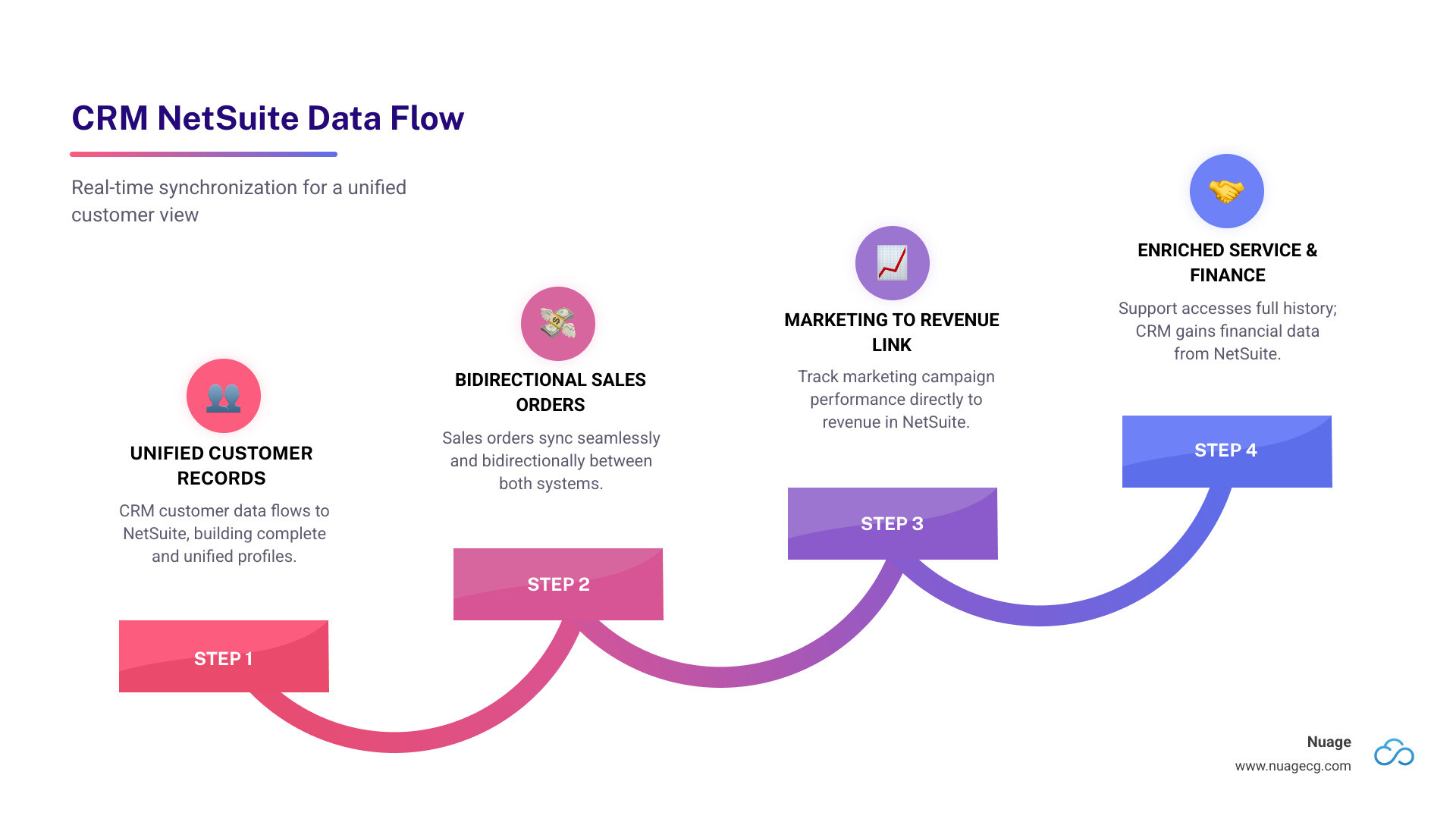
Imagine your sales, marketing, service, and finance teams all accessing the same, up-to-the-minute customer information. This is the power of a unified 360-degree customer view, a core benefit of CRM NetSuite integration.
This integration eliminates data silos, where customer data is fragmented across different systems. By synchronizing your CRM and ERP, you ensure data consistency and create a single, reliable source of truth. This comprehensive view of customer interactions, from initial marketing contact to sales history and support tickets, enables more informed decision-making across the organization. Companies with highly aligned systems often see significant improvements in revenue growth and operational efficiency. To take this a step further, you can learn how to integrate NetSuite and Salesforce data for business analytics and open up even deeper insights.
Empowering Your Sales, Marketing, and Service Teams
A seamless CRM NetSuite integration provides your customer-facing teams with the tools and data they need to excel.
- Sales Team: Gains a complete view of the customer, including order history, payment status, and inventory levels, all within their CRM. This enables more accurate forecasting, faster quote-to-order processes, and a more professional customer experience.
- Marketing Team: Can finally close the loop on campaign ROI by tracking leads from initial engagement all the way to a closed sale in NetSuite. This allows for better campaign management and more effective lead nurturing.
- Customer Service Team: Accesses a complete customer history, including past purchases and support tickets, without switching between systems. This leads to faster, more personalized support and increased customer satisfaction.
Driving Operational Efficiency and Revenue Growth
By connecting your CRM and NetSuite, you can automate many manual processes, leading to significant gains in efficiency and a direct impact on your bottom line.
One of the most immediate benefits is the elimination of redundant data entry. When a sales rep closes a deal, the information automatically flows to the finance and fulfillment teams, reducing the risk of human error and freeing up valuable time. This automation extends to other workflows, such as order processing, invoicing, and inventory management.
With streamlined processes and more accurate data, your teams can focus on high-value activities like nurturing leads, building customer relationships, and identifying new growth opportunities. This improved efficiency and focus directly contribute to increased revenue and a stronger competitive advantage. For more on this, explore NetSuite Salesforce automation.
Navigating Your Options for a CRM NetSuite Integration
Choosing the right integration method is critical and depends on your budget, technical resources, and the complexity of your business processes. It’s not a one-size-fits-all solution; what works for one business might not be ideal for another.
The Role of APIs in Your CRM NetSuite Integration Strategy
At the heart of almost every modern CRM NetSuite integration lies the Application Programming Interface, or API. Think of APIs as a universal language that allows different software applications to communicate with each other. They provide a standardized way to exchange data securely and efficiently, reducing the need for manual data entry and complex custom coding.
NetSuite offers its own powerful native integration platform called SuiteTalk, which uses both SOAP and REST APIs. These APIs are the foundation for building connections that allow your CRM and NetSuite to share information automatically. For example, when a customer’s contact information is updated in your CRM, the API can instantly update the corresponding record in NetSuite, ensuring data consistency across your systems. Understanding how these APIs work is fundamental to any successful integration strategy. Learn more about the technical side of NetSuite API integration.
Comparing Integration Methods
When considering a CRM NetSuite integration, you’ll typically encounter three main approaches, each with its own advantages and disadvantages.
| Integration Method | Advantages | Disadvantages |
|---|---|---|
| Native Connectors | Simple, pre-built solutions for common applications. Often the most cost-effective and quickest to implement. | May lack the flexibility to handle complex or unique business processes. |
| iPaaS (Integration Platform as a Service) | Highly flexible and scalable, with pre-built connectors for many popular applications. Offers robust tools for managing and monitoring data flows. | Can be more expensive than native connectors and may require specialized expertise to configure and maintain. |
| Custom Development | Offers complete control and can be custom to your exact business requirements. A future-proof solution when well-documented. | The most time-consuming and expensive option, requiring significant development resources and ongoing maintenance. |
For many businesses, an iPaaS solution strikes the right balance between flexibility and ease of use. These platforms act as a middle layer, simplifying the process of connecting different systems. For simpler needs, a native connector might be sufficient, while complex, unique requirements may call for custom development. You can explore various Salesforce NetSuite Connector options to see how these solutions work.
Understanding the NetSuite Integration Platform
NetSuite also offers its own powerful integration solution, the NetSuite Integration Platform. This is an add-on module designed to connect your entire business ecosystem—including CRM, e-commerce, and other applications—with NetSuite at the core.
The platform provides a range of pre-built connectors, real-time data synchronization, and a low-code interface that allows both technical and non-technical users to build and manage integrations. By leveraging the power of the underlying Oracle Cloud Infrastructure (OCI), it offers a scalable and secure way to automate workflows and eliminate data silos, making NetSuite the central hub for all your business data. For a deeper dive, check out What is NetSuite Integration Platform?.
Planning for a Successful Implementation
A well-planned integration project minimizes disruption, manages costs effectively, and ensures the final solution meets your strategic business goals. Rushing into an integration without proper foresight can lead to headaches, budget overruns, and a system that doesn’t meet expectations.
Key Considerations and Potential Challenges
Before starting your CRM NetSuite integration journey, it’s crucial to consider several factors and anticipate potential challenges.
- Data Mapping: This is arguably the most critical step. You need to carefully define which fields in your CRM correspond to which fields in NetSuite. What happens when a “customer” in one system is a “client” in another? Careful data mapping ensures consistency and accuracy.
- Data Migration: Planning how historical data will be moved is essential. Will it be a one-time transfer, or will specific historical data be synchronized? Backing up all data before starting migration is a non-negotiable best practice.
- Defining the “System of Record”: For each data point (e.g., customer address, sales order status), you must decide which system is the authoritative source. This prevents data conflicts and ensures everyone knows where to make updates.
- NetSuite Concurrency Limits: NetSuite limits the number of simultaneous connections per license. High-volume integrations might require additional licenses or optimized architecture to avoid performance issues.
- API Limitations: While APIs are powerful, they have limits. Both NetSuite’s SuiteTalk and your CRM’s API will have usage caps. Understanding these limitations is key to designing a reliable integration. For instance, some Salesforce editions have different levels of API access, which you can review on their official documentation.
- System Compatibility: Ensure that both systems can communicate reliably. This includes assessing network infrastructure, security protocols, and any firewalls that might impede data flow.
Addressing these considerations upfront helps build a robust, efficient, and reliable integration solution that truly improves your business operations.
Budgeting for Your Integration: What to Expect
Understanding the costs associated with a CRM NetSuite integration is vital for effective planning. The cost will depend on the integration method, the complexity of your data flows, and the specific CRM being integrated.
Common cost factors include:
- Platform Licenses: If you opt for an iPaaS solution, you’ll likely have subscription fees for that platform.
- Development/Consulting Fees: Custom integrations or complex iPaaS setups require skilled developers or consultants. These fees vary based on the project’s scope.
- Add-on Modules: Your integration might require additional modules for NetSuite or your CRM, which will add to the cost.
- Ongoing Maintenance & Support: Integrations need monitoring and maintenance to ensure they continue to run smoothly as your business and systems evolve.
Pre-built connectors are often the most cost-effective option for simple needs, while complex, custom integrations represent a more significant investment. It’s important to develop a data integration strategy that considers both the initial setup and long-term maintenance costs.
Best Practices for a Seamless CRM NetSuite Integration
A successful CRM NetSuite integration is about more than just connecting two systems; it’s about optimizing your business processes. Following these best practices will help ensure a smooth implementation and long-term success.
- Define Clear Objectives: Before you begin, clearly articulate what you want to achieve. What problems are you solving? What data needs to flow where, and how often?
- Involve Key Stakeholders: Engage people from all affected departments (sales, marketing, finance, etc.) early in the process. Their input is crucial for defining requirements and ensuring user adoption.
- Choose the Right Integration Method: Evaluate native connectors, iPaaS solutions, and custom APIs based on your specific needs, budget, and technical resources.
- Prioritize Data Quality: Ensure your data is clean and consistent before you integrate. Establish rules for data governance to maintain data integrity across both systems.
- Start with a Phased Approach: For complex projects, consider a phased rollout. Begin with the most critical data flows and a small group of users, then expand from there.
- Test Thoroughly: Test all aspects of the integration, including data synchronization, error handling, and user workflows, to ensure everything works as expected.
- Focus on Security: Implement robust security measures, such as encryption and access controls, to protect sensitive customer and financial data.
- Provide Comprehensive Training: A successful integration requires that your team knows how to use the new system. Provide thorough training and clear documentation to all users.
- Plan for Ongoing Support: An integration is not a one-time project. Plan for ongoing monitoring, maintenance, and support to address any issues and adapt to future needs.
- Document Everything: Keep detailed records of your integration, including data maps, workflows, and technical specifications. This documentation will be invaluable for future troubleshooting and updates.
By following these best practices, you can ensure your CRM NetSuite integration is a success that delivers lasting value to your organization.
Frequently Asked Questions about CRM and NetSuite Integration
Which CRMs are most commonly integrated with NetSuite?
While NetSuite’s flexible integration capabilities allow you to connect virtually any CRM system, some platforms stand out due to their popularity, robust features, and the availability of proven integration solutions. The most commonly integrated CRMs with NetSuite include:
- Salesforce: Often chosen by larger enterprises, Salesforce combines powerful CRM capabilities with NetSuite’s comprehensive ERP functions. This integration provides a 360-degree view of customer data, allowing sales reps and managers to better understand their audience and interact more productively. We often assist with Salesforce integration with NetSuite projects for our clients.
- HubSpot: Popular for its inbound marketing, sales, and customer service features, HubSpot integration with NetSuite allows for seamless data flow between marketing, sales, and financial systems. It’s an ideal way to manage all these activities in one place, open uping the full power of NetSuite’s cloud ERP paired with HubSpot’s intelligent automation.
- Zoho CRM: A comprehensive and often more cost-effective CRM, Zoho integration with NetSuite improves collaboration between sales and finance teams, ensuring consistent data updates and streamlined operations.
These CRMs are frequently integrated because they offer a blend of advanced front-office functionality that complements NetSuite’s powerful back-office capabilities, providing businesses with the best of both worlds.
Can I perform a NetSuite integration myself?
The short answer is: it depends on the complexity of the integration and your internal technical resources.
For very simple, straightforward integrations, particularly those involving common applications with pre-built connectors available on the SuiteApp.com marketplace, a technically savvy internal team might be able to manage it. NetSuite also offers low-code tools like SuiteFlow for basic workflow automation.
However, most business-critical or custom integrations, especially those involving complex data mapping, bidirectional data flows, real-time synchronization, or specific business logic, typically require specialized expertise. Here’s why:
- API Knowledge: You need a deep understanding of both NetSuite’s SuiteTalk APIs (SOAP and REST) and the third-party CRM’s APIs.
- Error Handling: Robust integrations anticipate and gracefully handle errors, ensuring data integrity even when things go wrong.
- Scalability: The integration needs to be designed to scale with your business growth and increasing data volumes.
- Maintenance: Integrations require ongoing maintenance as system versions update or business processes change.
Engaging with professional integration companies or consultants who specialize in NetSuite and CRM systems, like us, can be an effective way to achieve a seamless and reliable integration. We have the experience to steer the complexities, manage potential challenges, and ensure the solution is robust and future-proof.
What is the difference between NetSuite CRM and a third-party CRM?
This is a fundamental question that often comes up when businesses consider their CRM strategy. While both aim to manage customer relationships, their core nature and integration with other business functions differ significantly.
-
NetSuite CRM: This is an integral component of the broader NetSuite ERP suite. Its primary strength lies in its native, out-of-the-box integration with NetSuite’s financials, inventory, order management, and other back-office operations. This means a seamless, unified view of the customer across the entire business lifecycle without the need for complex, separate integration projects. Data flows effortlessly between CRM functions (sales, marketing, service) and ERP functions (accounting, fulfillment). The benefit is a single system of record and unparalleled operational efficiency.
-
Third-Party CRM (e.g., Salesforce, HubSpot, Zoho): These are standalone, specialized applications designed primarily for customer relationship management. Their strength often lies in offering more specialized, best-of-breed features for sales, marketing automation, or customer service. Businesses might choose them for their specific functionalities, extensive ecosystems, or because their teams are already familiar with them. However, to achieve a unified view of the customer and integrate with financial and operational data, they require integration with an ERP system like NetSuite.
NetSuite CRM offers a unified platform where CRM and ERP capabilities are inherently intertwined. A third-party CRM offers specialized functionality that, when integrated with NetSuite, aims to combine that best-of-breed front-office power with NetSuite’s comprehensive back-office strength. To understand the broader context, you might find this video helpful: Watch a video on CRM vs ERP.
Conclusion: Unifying Your Tech Stack for Growth
In today’s business landscape, the efficiency of your operations hinges on how well your systems communicate. CRM NetSuite integration is not just a technical task; it’s a strategic investment that creates a single source of truth, drives enterprisewide efficiency, and empowers your teams with the data they need to succeed. From our offices in Manhattan Beach, CA, and Ponte Vedra and Jacksonville, FL, we’ve seen how crucial this is for businesses across various industries.
By breaking down data silos, automating workflows, and providing a unified 360-degree view of your customers, integration transforms how your sales, marketing, and service teams operate. It reduces manual errors, boosts productivity, and ultimately contributes to significant revenue growth. Whether you choose NetSuite’s native CRM or opt to integrate a best-of-breed third-party solution, the goal remains the same: a connected, cohesive business ecosystem.
The right approach for your CRM NetSuite integration depends on your unique business needs, existing technology investments, technical resources, and long-term strategic goals. Navigating the various integration methods—from native connectors and iPaaS solutions to custom APIs—requires careful planning and expertise.
As a NetSuite Optimization Engine, we at Nuage help businesses steer these complexities. We don’t just sell software; we partner with you to determine the optimal solutions and then design, implement, and support a fully integrated and efficient ecosystem custom to your specific requirements. We pride ourselves on having over 20 years of experience in digital change, ensuring that your NetSuite environment works harder for your business.
To build a connected business ready for the future, explore our comprehensive NetSuite solutions and let us help you open up the full potential of your technology stack.